

- Tool permissions answer “should this call run, and who decides?”
- User-first tools answer “can the agent reach for this tool on its own?”
For end users
Approving or rejecting a call
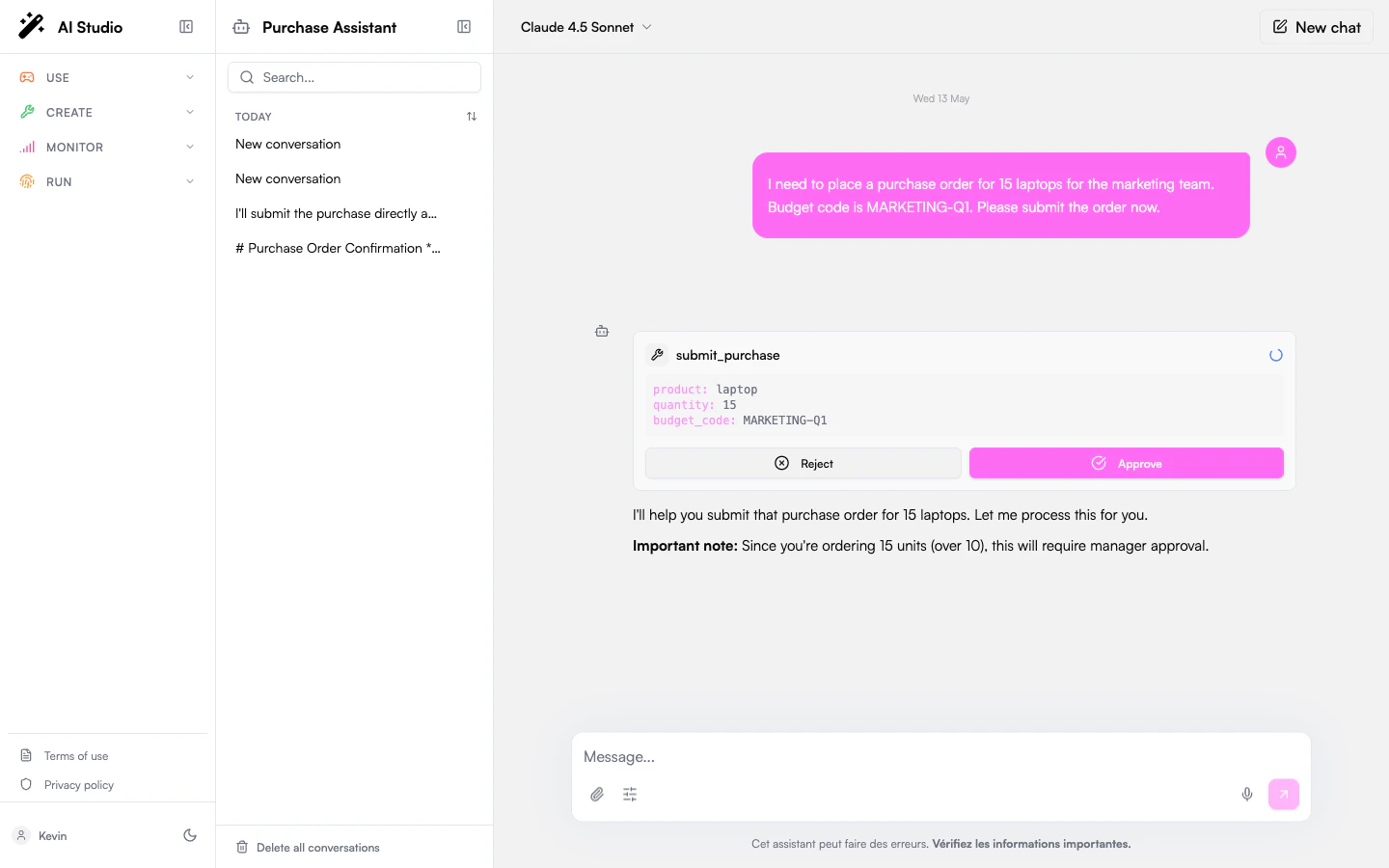
When a tool needs approval, the chat pauses on a card showing the tool name, the arguments the agent is about to send, and Approve / Reject buttons.- Approve → the call runs and the agent picks up.
- Reject → the agent is told you said no and adapts.
Several tools in one message. A model often asks for more than one tool at a time. When one of them needs approval, the others are held with it rather than dropped: your decision is applied to that call, and the turn then resumes with the whole set, so the agent never ends up answering with half of the results it asked for.
- Answering with a message instead of a button denies the pending tools. Your message is delivered as the next thing the agent hears, nothing disappears from the conversation, and the agent adapts as it would after a Reject.
- Refreshing the page keeps the approval. The card comes back actionable on the message it belongs to, so an approval left open can be resolved later, or from another device.
- System tools are never gated. Policies apply to the tools acting on the outside world; the agent’s internal machinery (
todo_write,budget_get_remaining,human_ask_clarification) runs without asking even under Always ask. See System tools by profile.
Designated approvers
For sensitive tools an administrator can route the approval to someone other than you: for example, a manager, an on-call group, or the agent’s owner. When that’s the case, you’ll see:“This action requires approval from a designated approver. You will be notified when it is resolved.”The current conversation stays paused until they decide. You can start a separate conversation with the agent in the meantime.
”Ask once” mode
Some tools are configured to ask only the first time they run in a conversation. Approve once and follow-up calls to the same tool run automatically until you start a new conversation. Each tool asks for itself. Approving one tool of an MCP integration doesn’t approve the rest of the integration: even when the administrator set the policy on the integration as a whole, every tool in it still asks the first time it runs.For administrators
Choose a default policy
Open the agent in Agent Creator → Settings → Permissions and set the Default policy. It applies to every tool that doesn’t have a per-tool override.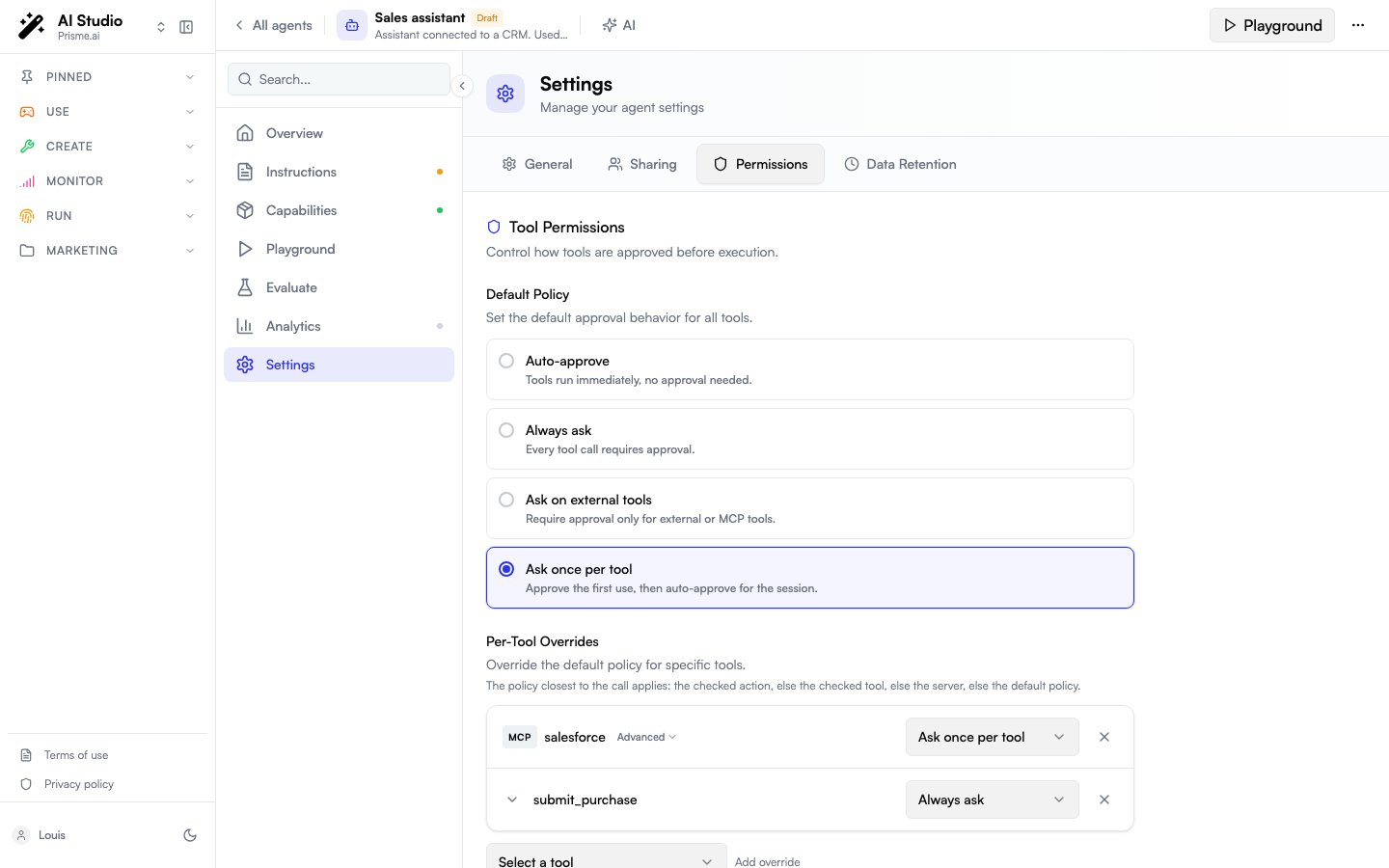
Per-tool overrides
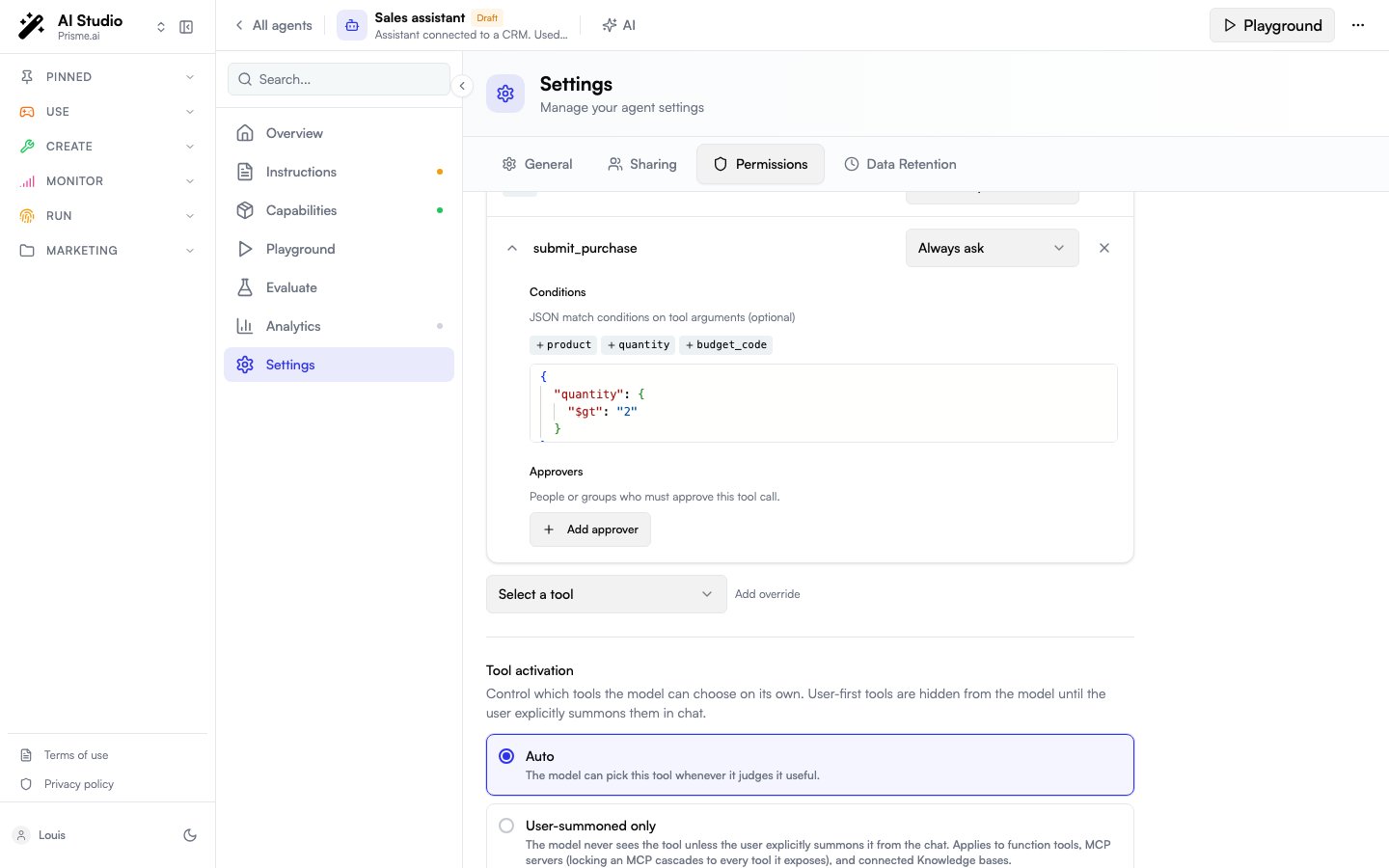
Add an override when a single tool needs a different policy from the default. Each rule supports:- A tool: a function tool, an MCP server, a single tool of that server, or a single action of that tool.
- A policy (one of the four above).
- Optional conditions: only pause when the call’s arguments match. Example: ask only when sending an email outside the company domain.
- Optional approvers: route the approval to designated reviewers instead of the chatting user.
Three levels: server, tool, action
An MCP integration is gated at three levels of granularity. A rule targets a tool by its canonical name,<server>__<tool>, so the level it sits at is readable from the rule itself:
delete guard above holds even though the permissive rule is written before it. See Which rule applies.
The action level is a connector convention, not an MCP notion. The MCP standard knows nothing about actions. Prisme.ai connectors expose one tool per entity and enumerate the operations in an
action field — records on Salesforce takes action: create | read | update | delete. The action level therefore appears only for a tool whose input schema enumerates such a field; every other tool stops at the tool level.Pick the tools from the server itself
On the row of an MCP server, Advanced expands the list of the tools that server actually exposes. The list is read live from the server rather than typed in by hand, so it follows the integration as it gains and loses tools.- Each tool in the list has a checkbox and its own policy selector.
- A tool left unchecked inherits the server’s policy: its selector is disabled and reads Inherits ·
<policy>, so you can see what applies to a tool without writing a rule for it. - Checking a tool writes a rule on its canonical name,
<server>__<tool>. - A tool whose schema enumerates an
actionfield also expands into an Actions list: one checkbox and one policy per action, saved asconditions: { action: "<value>" }on the tool’s canonical name. - A search field appears when the list is long. A checked tool that the filter hides stays checked, so filtering never drops a rule; a search that matches nothing says so rather than showing an empty list.
- Designated approvers are set in the same expanded area of the server’s row.
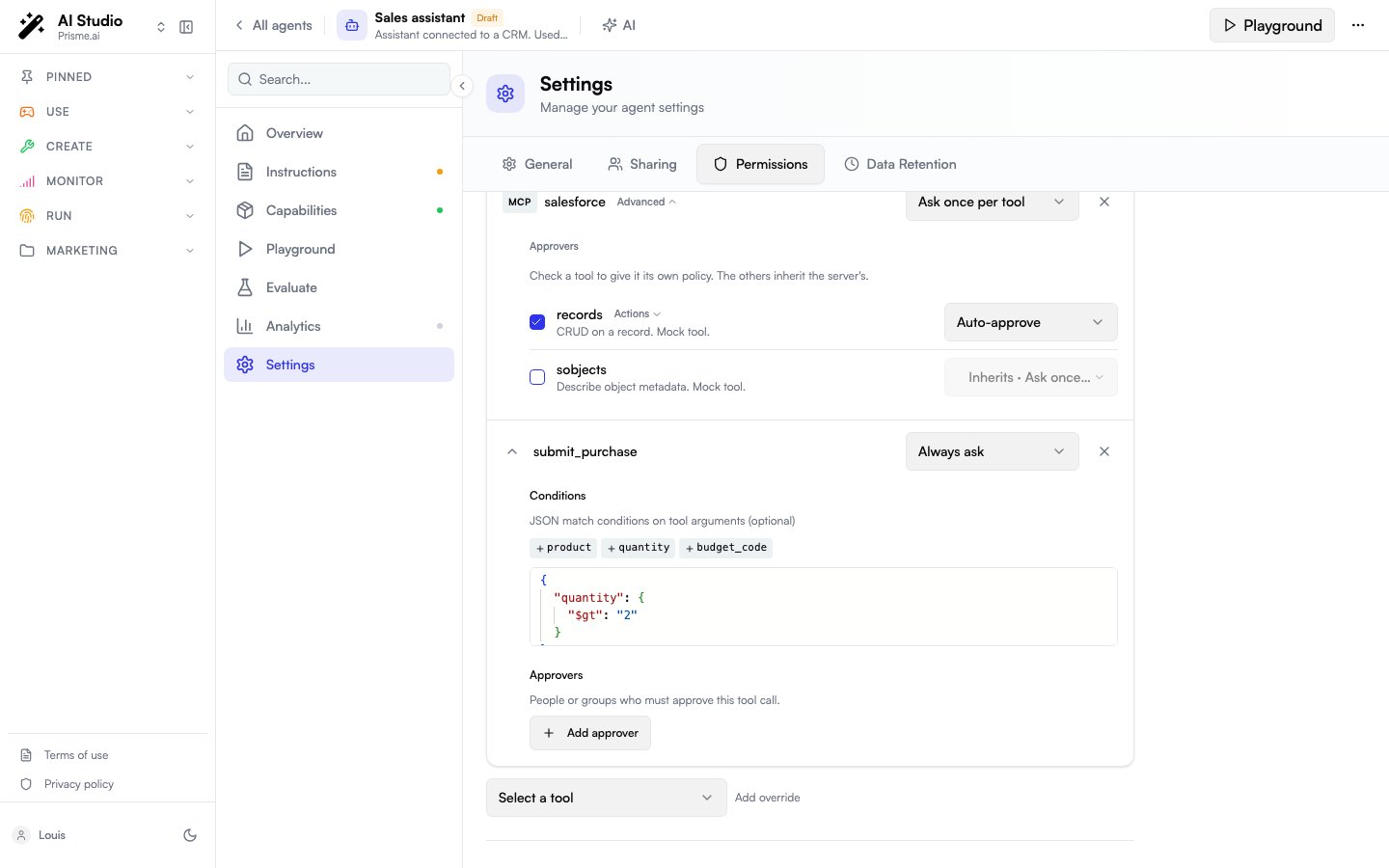
action field enumerates, each with the same checkbox and selector, so one operation can be held while the rest of the tool runs freely.
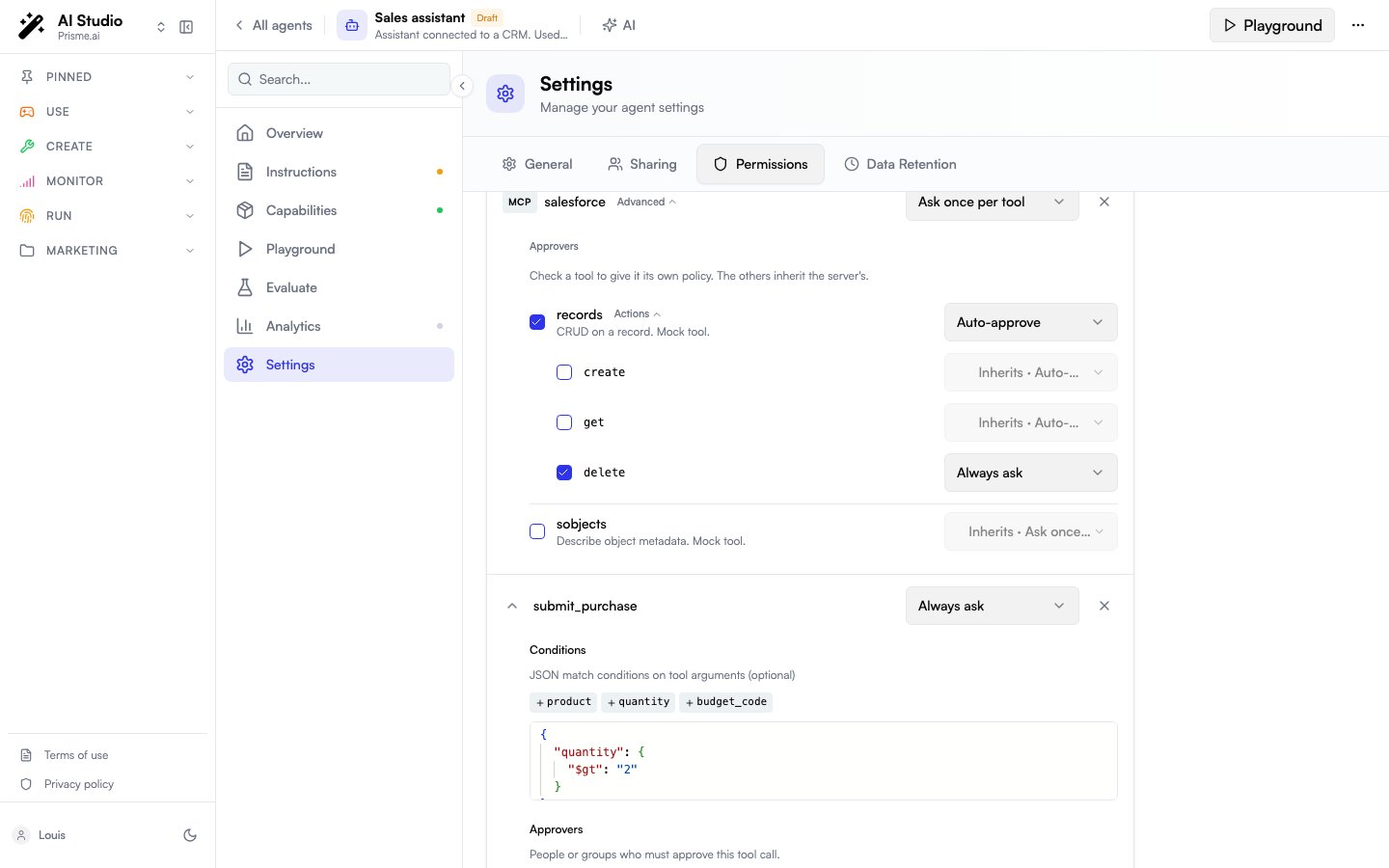
States of the tool list
The list is only as available as the server behind it. In every state below, the rules already saved stay visible and editable, and nothing is lost when you save.
Three kinds of rules can’t be shown as a checkbox in the list, so they appear apart from it:
- Saved rules on tools absent from the list — a tool the server has dropped, or a list that couldn’t be fetched. They are grouped in a section of their own, where they stay editable and deletable, and are kept when you save.
- Advanced rule — a rule whose
conditionsare more than a plainactionvalue: a matching operator, several keys, another argument. It is displayed read-only, badged as such, and kept exactly as it is. - Orphan rule — a rule whose prefix matches no MCP server currently attached to the agent, typically left behind by a removed integration. It is kept too, so re-attaching the integration brings its rules back into the list.
Designated approvers
approvers can be:
- Owner: the user who created the agent.
- User: a specific user.
- Group: anyone in the group.
Locking a whole MCP integration
A rule on an MCP server (e.g.{ tool: "github", policy: "always_ask" }) applies to every tool the server exposes: create_issue, update_issue, search_repos, … This matches how administrators usually think about integrations: gate it as a whole rather than enumerating its dynamic children.
- A server rule lends its policy to each of its tools, not a single approval. With
ask_firston an MCP parent, every tool of the server asks the first time it runs in the conversation: approvingcreate_issuedoesn’t letsearch_reposthrough. - A rule on a specific child name still wins over the parent rule, useful to lift a single child out of a restriction. Advanced on the server’s row writes one for you from the server’s own tool list, without typing the name; see Pick the tools from the server itself.
Composition with user-first activation
If the agent tries to call a user-first tool without being summoned, the call is silently blocked; it never reaches the approval gate.
Behavior reference
Which rule applies
For a given call, the platform keeps the most specific rule that matches, from the narrowest to the widest:- A rule on the tool’s canonical name,
<server>__<tool>. - A rule on the tool’s bare name, for rules written before tool names carried their server’s prefix.
- A rule on the MCP server.
- The default policy.
conditions match the call wins over the rule without conditions, whatever their order in the list. An action-level guard can therefore be stricter than its tool, and a permissive catch-all never makes it unreachable.
The “ask first” memory is per conversation and per tool — and per set of conditions, when the rule that matched carries any. Approving one tool never approves another, including another tool of the same MCP server. Pending approvals survive page reloads; you can come back later and resolve.
Decisions made by designated approvers are recorded by the platform so your team’s notification or audit tooling can react to them.
FAQ
Can I require two approvers for the same call?
Can I require two approvers for the same call?
Not yet. The pending approval resolves as soon as one configured approver acts.
Does 'ask first' persist across conversations?
Does 'ask first' persist across conversations?
No. It’s per-conversation. A new conversation prompts again.
I approved one tool of an MCP integration. Are its other tools approved too?
I approved one tool of an MCP integration. Are its other tools approved too?
No. The approval is remembered for the tool you approved, not for the integration. A rule set on the server gives all of its tools the same policy, so the next tool of that same server asks for itself the first time it runs.
Can an action be stricter than the tool it belongs to?
Can an action be stricter than the tool it belongs to?
Yes, that’s the point of the action level. Leave the tool on Auto-approve and set Always ask on its
delete action: the conditional rule wins over the tool’s own rule whatever their order in the list. The action level is available for tools whose schema enumerates an action field.Reject vs Stop generating: what's the difference?
Reject vs Stop generating: what's the difference?
Reject tells the agent the specific call was refused; it can adapt or try something else. Stop generating halts the whole run.
Can I self-approve as the owner?
Can I self-approve as the owner?
Add
{ type: owner } to the rule’s approvers. When the chatting user is the owner, the approval is delivered to them.Does this apply to skills, guardrails, or file search?
Does this apply to skills, guardrails, or file search?
No. The approval gate applies to function tools and MCP tool calls.
Related
- User-First Tools: control whether the agent sees a tool at all.
- Custom Tools: the function tools you’ll most often want to gate.
- Capabilities: overview of all tool types.