

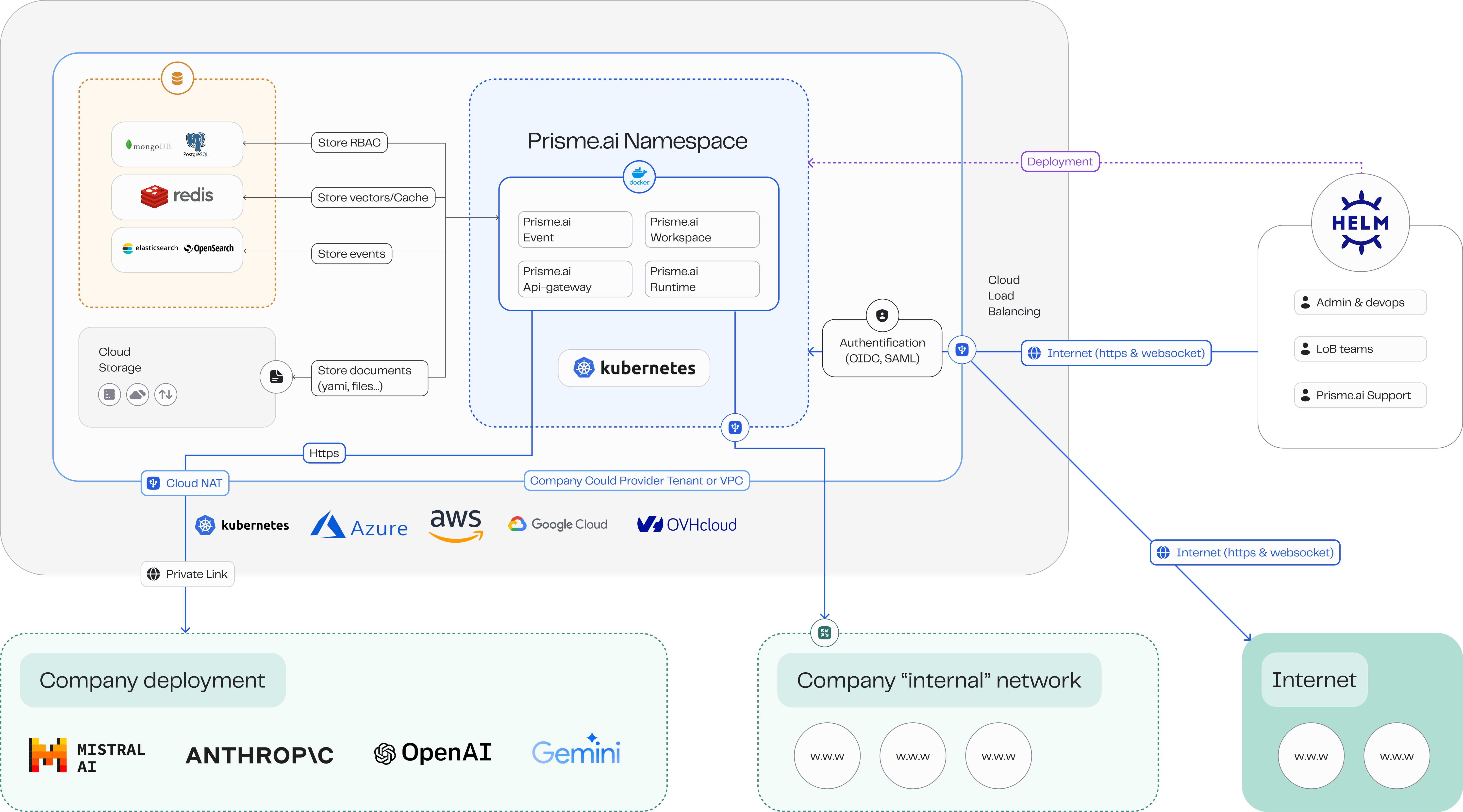
- SaaS Managed by Prisme.ai: Shared or dedicated managed service hosted by Prisme.ai.
- Self-Hosted or Co-Managed: Deploy on your cloud of choice including AWS, GCP, Azure, OVH Cloud, or any cloud offering managed Kubernetes.
Why Choose Self-Hosting?
Choosing self-hosting provides your organization with:- Data Sovereignty: Keep your sensitive data within your control.
- Security Compliance: Meet industry-specific security and compliance requirements.
- Customization and Integration: Fully customize and integrate Prisme.ai into your existing workflows and systems.
- Cost Efficiency: Optimize resource allocation and management.
Deployment Options
Prisme.ai supports various deployment scenarios to suit your organization’s infrastructure strategy:- Cloud-Agnostic Deployment: Compatible with AWS, Azure, Google Cloud, and private cloud providers.
- Kubernetes-native: Deployed via Helm charts on any conformant Kubernetes cluster.
- High Availability: Designed for redundancy and resilience.
- Scalability: Easily scale horizontally and vertically based on workload.
Supported Environments
Prisme.ai self-hosting runs on any Kubernetes 1.26+ cluster, including:- Cloud provider-managed services like EKS, AKS, GKE, OVHcloud Managed Kubernetes.
- OpenShift.
- Self-managed Kubernetes on bare metal or VMs.
Platform microservices
Prisme.ai is deployed as two Helm releases, each in its own Kubernetes namespace.core namespace
Always required. Handles authentication, workspace storage, automation execution and the user-facing console.
apps namespace
Optional services that extend the platform with custom code, web crawling and search.
See Install with Helm for how each service is configured and wired to the databases.
Next Steps
Installation Overview
Five-step install flow, from cloud provisioning to operations.
Requirements
Infrastructure prerequisites, sizing baseline, networking.
Install with Helm
Unified Helm install reference for core and apps namespaces.
Databases
PostgreSQL or MongoDB, Redis, Elasticsearch or OpenSearch.
Need detailed architecture diagrams (draw.io) tailored to your deployment? Contact support@prisme.ai.