

What You’ll Build
Three agents that cooperate:- Policy Expert: a knowledge-grounded specialist that answers procurement-policy and compliance questions from a Knowledge Base.
- Purchase Assistant: an agent that checks inventory and submits purchase orders through two custom functions, with human approval on sensitive actions.
- Prisme Orchestrator: a level-5 orchestrator that delegates to the two specialists (A2A) and combines their answers.
This is the new Prisme.ai platform (“one-product”). All three agents live in Agent Creator; there is no Builder workspace to manage. The mock inventory and purchase endpoints used below are public sandbox webhooks, so you can follow along without building any backend.
Prerequisites
Before starting, make sure you have:- Access to a Prisme.ai workspace with Agent Creator and Knowledges enabled
- The knowledge-base document for the Policy Expert: Download the Purchase Policy (PDF)
- Basic familiarity with agent profiles
Step 1: Specialist #1 (Policy Expert)
This agent answers procurement-policy questions, grounded in the purchase-policy document.1a. Create the Knowledge Base
1
Open Knowledges
From AI Studio, open the Knowledges product. Go to Knowledge Bases and click + Create.
2
Name it
Name the Knowledge Base KB Prisme and add a short description (“Prisme procurement policy and payment authorizations”). Pick an embedding model; the choice is permanent.
3
Upload the document
Open KB Prisme, go to its documents tab, click Add Documents, and upload the Purchase Policy PDF you downloaded. Wait for processing to finish (text extraction → chunking → embeddings).

1b. Create the agent
1
Open Agent Creator
Switch to Agent Creator and click + Create agent. Choose From Scratch.
2
Name and describe
- Name:
Policy Expert - Description:
Specialist in Prisme procurement policies, compliance rules, and approval workflows.
3
Paste the instructions
Use the system prompt below.
4
Attach the Knowledge Base
In the agent’s Capabilities tab, attach the KB Prisme Knowledge Base you created in 1a.
Why repeat the policy in both the prompt and the Knowledge Base? The prompt gives the agent quick rules of thumb; the Knowledge Base lets it quote exact thresholds and sections on demand. The line “Call the knowledge base KB Prisme…” tells the agent when to retrieve.
1c. Test it
Open the Playground and ask:Explain the Purchase Policy and the Payment Authorizations.The agent should answer and cite chunks retrieved from KB Prisme.
Step 2: Specialist #2 (Purchase Assistant)
This agent does the operational work: check stock, then submit an order, with a budget code and human approval on submissions.2a. Create the agent
1
Create the agent
In Agent Creator, click + Create agent → From Scratch.
- Name:
Purchase Assistant - Description:
Helps employees with purchase requests, inventory checks, and policy questions for Prisme.
2
Paste the instructions
Use the system prompt below. It includes dynamic variables (
${date}, ${user_email}, ${ip}, …) that Agent Creator fills in at runtime.3
Attach the Knowledge Base
In Capabilities, attach KB Prisme so the assistant can answer policy questions too.
2b. Add the custom functions
Both tools are public sandbox webhooks; you can use them as-is. In Capabilities, click Add Capability → Custom tab → Custom Function, and fill the form for each.- check_inventory
- submit_purchase
Parameters Schema:
2c. Require approval before submitting an order
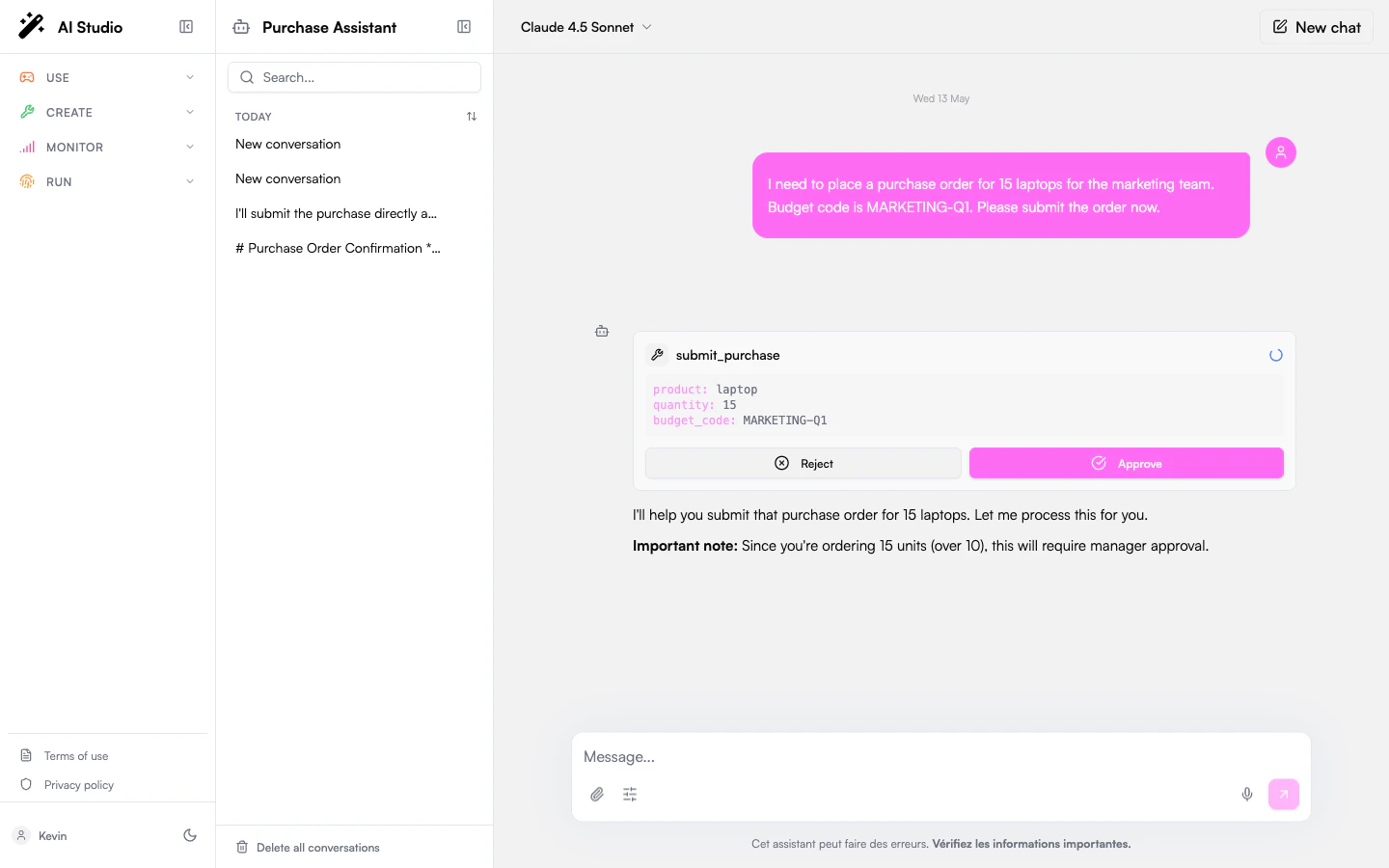
submit_purchase spends money; gate it behind a human. Open the agent’s Settings → Permissions and set the Default policy to Always ask (or add a per-tool override on submit_purchase). Now every submission pauses on an approval card with Approve / Reject buttons.
2d. Test it
In the Playground, run these in order and watch the tool calls:Is the webcam in stock? How much does it cost?
Submit a purchase order for 15 monitors. Budget code: IT-2026-003
I need to buy a $120,000 training for my team. It is a training for a new software. Budget code: IT-2026-123You should see: an inventory lookup; an order that triggers the approval card (15 units > 10); and the $120K request stopped per the CFO rule. Try the Embedded Chat preview to see how the agent looks once exposed to end users.
Step 3: The Orchestrator (Agent-to-Agent)
Now the centerpiece: a level-5 Orchestrator that delegates to the two specialists instead of doing the work itself.3a. Create the orchestrator agent
1
Create with the Orchestrator profile
Click + Create agent. When choosing the profile, pick Orchestrator (level 5). This unlocks the
agent_delegate and agent_list_available system tools and raises the budget (50 turns, 200K tokens, delegation depth 3).2
Name, describe, and pick the model
- Name:
Prisme Orchestrator - Description:
Central assistant that coordinates between specialist agents for purchase requests and policy questions. - Model:
Claude Sonnet 4.5
3
Paste the instructions
Use the system prompt below.
3b. Add the specialists as sub-agents
This is the A2A wiring. In the orchestrator’s Capabilities tab:1
Add the first sub-agent
Click Add Capability, select type Sub-Agent, and pick Policy Expert from the published agents. Optionally override the display name (e.g.
Policy_Expert).2
Add the second sub-agent
Repeat: Add Capability → Sub-Agent → Purchase Assistant (e.g.
Purchase_Assistant).Each specialist must be published to appear in the sub-agent picker. A sub-agent keeps its own configuration: its Knowledge Base, custom functions, and approval policy still apply when the orchestrator calls it. Delegation is exposed to the orchestrator via the
agent_delegate tool; see Capabilities → System Tools.3c. (Optional) Add an email function
The demo also lets the orchestrator send a recap email via asend_email custom function.
- send_email (optional)
Parameters Schema:
3d. Test delegation
In the orchestrator’s Playground, try a simple delegation, then a composed one:What’s the maximum amount a Director can approve without VP sign-off?
Is the webcam in stock? How much does it cost?
Submit a purchase order for 15 monitors. Budget code: IT-2026-003Watch the trace: the orchestrator calls
agent_delegate, routes the first question to Policy Expert and the others to Purchase Assistant, then summarizes. The 15-monitor order still triggers Purchase Assistant’s approval card: the sub-agent’s policy is enforced.
Step 4: Trace, test & evaluate
Once the flow works, lock it in with a golden test set.1
Read the execution trace
In the Playground, expand each step to see the delegation chain (which sub-agent was called, with what input, and what it returned). This is how you debug routing.
2
Create a golden test set
On the Prisme Orchestrator, open the Evaluate tab and add a test case. For example:
Question: I need to order 5 keyboards for my engineering team. Budget code: ENG-2026-042 Expected answer: the order is auto-approved (5 units < 10, well under the $5,000 limit) with an order ID and a 3-5 business-day delivery estimate.
3
Assert on tools
Where supported, mark Delegated as an expected tool (the orchestrator must delegate, not answer from memory) and send_email as a forbidden tool for this case. Re-run the suite after any change to instructions, sub-agents, or models.
Going further
The full demo extends this A2A core with five more layers. Each maps to existing product docs:Security & identity
Security & identity
- SSO (OIDC/SAML) with your directory, mapped to RBAC roles in Governance.
- On-Behalf-Of: an agent calls a connector (e.g. SharePoint) under the user’s identity, so retrieval respects their permissions.
- Guardrails on the orchestrator: PII detection (email, phone, credit card, IP), prompt-injection detection (set to High), and a topic guard (allow: purchasing, procurement, inventory, policies, budget, orders, products; block: politics, sports, coding, weather, personal advice). Test it with classic jailbreak prompts (“ignore all previous instructions…”) and confirm the guardrail blocks before execution.
Governance & FinOps
Governance & FinOps
In Governance: the capabilities catalog, subscriptions, and Agent Control (default model, quotas, hard/soft blocks, routing strategy). Track spend with FinOps dashboards & budget caps, add models with per-model max tokens, and review per-agent Statistics in Agent Creator. Agents and workflows can be exported in readable formats.
Catalog & sharing
Catalog & sharing
Publish the orchestrator to the catalog with Restricted access, and manage who can discover and subscribe to it. See Discovering Agents.
Insights
Insights
In Insights → Agent Graph, delegation relationships appear as emerald “Delegates” edges between the orchestrator and its specialists, a live map of your A2A topology. See Insights → Graph.
Wrapping up
You built a working A2A system: two specialist agents (one RAG-grounded, one tool-driven with human approval) and a level-5 Orchestrator that delegates to them and combines their answers, all in Agent Creator, with no backend to maintain. The same pattern scales to any domain: build focused specialists, then compose them under an orchestrator with clear delegation rules.Next Steps
No-Code RAG Agent
Go deeper on Knowledge Bases and retrieval for your specialist agents.
Agent Capabilities
See every capability type: tools, knowledge, guardrails, sub-agents.
Tool Permissions
Configure human-in-the-loop approval for sensitive actions.
Agent Graph
Visualize delegation and tool usage across all your agents.