> ## Documentation Index
> Fetch the complete documentation index at: https://docs.prisme.ai/llms.txt
> Use this file to discover all available pages before exploring further.
# Crawl a Website
> Discover, index, and keep website pages searchable in an Knowledges base
Website crawling turns a public website or a section of a website into searchable documents. Use it when an agent needs answers from multiple pages that change over time, such as documentation, help centers, public policies, or product pages.
 ## Choose the right ingestion method
| Method | Use it when |
| ------------------ | -------------------------------------------------------------------------------- |
| **Single URL** | You only need one page, such as one policy, article, or release note. |
| **Auto-Discovery** | You need Knowledges to follow links and index several pages from the same site. |
| **Connector** | The content lives in an authenticated source such as SharePoint or Google Drive. |
| **File upload** | You already have exported files such as PDFs, DOCX, CSV, or HTML. |
For a normal website crawl, use **Auto-Discovery**.
## Before you start
Prepare the crawl scope before opening Knowledges:
* Pick the smallest useful starting URL. Prefer `https://docs.example.com/product` over the website homepage when only one section matters.
* Decide which paths must be included and excluded.
* Check whether the site publishes a sitemap.
* Confirm that the content is accessible to the Prisme.ai platform from the network where it runs.
* Avoid crawling private or sensitive content unless the knowledge base sharing rules are already configured.
The crawler follows the target website's robots.txt rules by default. Keep this enabled unless your organization explicitly controls the crawled site and allows a different behavior.
## Start a website crawl
1. Open **Knowledges**.
2. Open the knowledge base that should receive the website pages.
3. Click **Add Web Source**.
4. Select **Auto-Discovery**.
5. Enter the starting URL.
6. Open **Hostname settings** if you need to narrow the crawl.
7. Click **Start Crawling**.
## Choose the right ingestion method
| Method | Use it when |
| ------------------ | -------------------------------------------------------------------------------- |
| **Single URL** | You only need one page, such as one policy, article, or release note. |
| **Auto-Discovery** | You need Knowledges to follow links and index several pages from the same site. |
| **Connector** | The content lives in an authenticated source such as SharePoint or Google Drive. |
| **File upload** | You already have exported files such as PDFs, DOCX, CSV, or HTML. |
For a normal website crawl, use **Auto-Discovery**.
## Before you start
Prepare the crawl scope before opening Knowledges:
* Pick the smallest useful starting URL. Prefer `https://docs.example.com/product` over the website homepage when only one section matters.
* Decide which paths must be included and excluded.
* Check whether the site publishes a sitemap.
* Confirm that the content is accessible to the Prisme.ai platform from the network where it runs.
* Avoid crawling private or sensitive content unless the knowledge base sharing rules are already configured.
The crawler follows the target website's robots.txt rules by default. Keep this enabled unless your organization explicitly controls the crawled site and allows a different behavior.
## Start a website crawl
1. Open **Knowledges**.
2. Open the knowledge base that should receive the website pages.
3. Click **Add Web Source**.
4. Select **Auto-Discovery**.
5. Enter the starting URL.
6. Open **Hostname settings** if you need to narrow the crawl.
7. Click **Start Crawling**.
 The crawl starts in the background. Knowledges creates one document per indexed page and processes each page like any other document: extraction, chunking, embeddings, then indexing.
## Configure the crawl
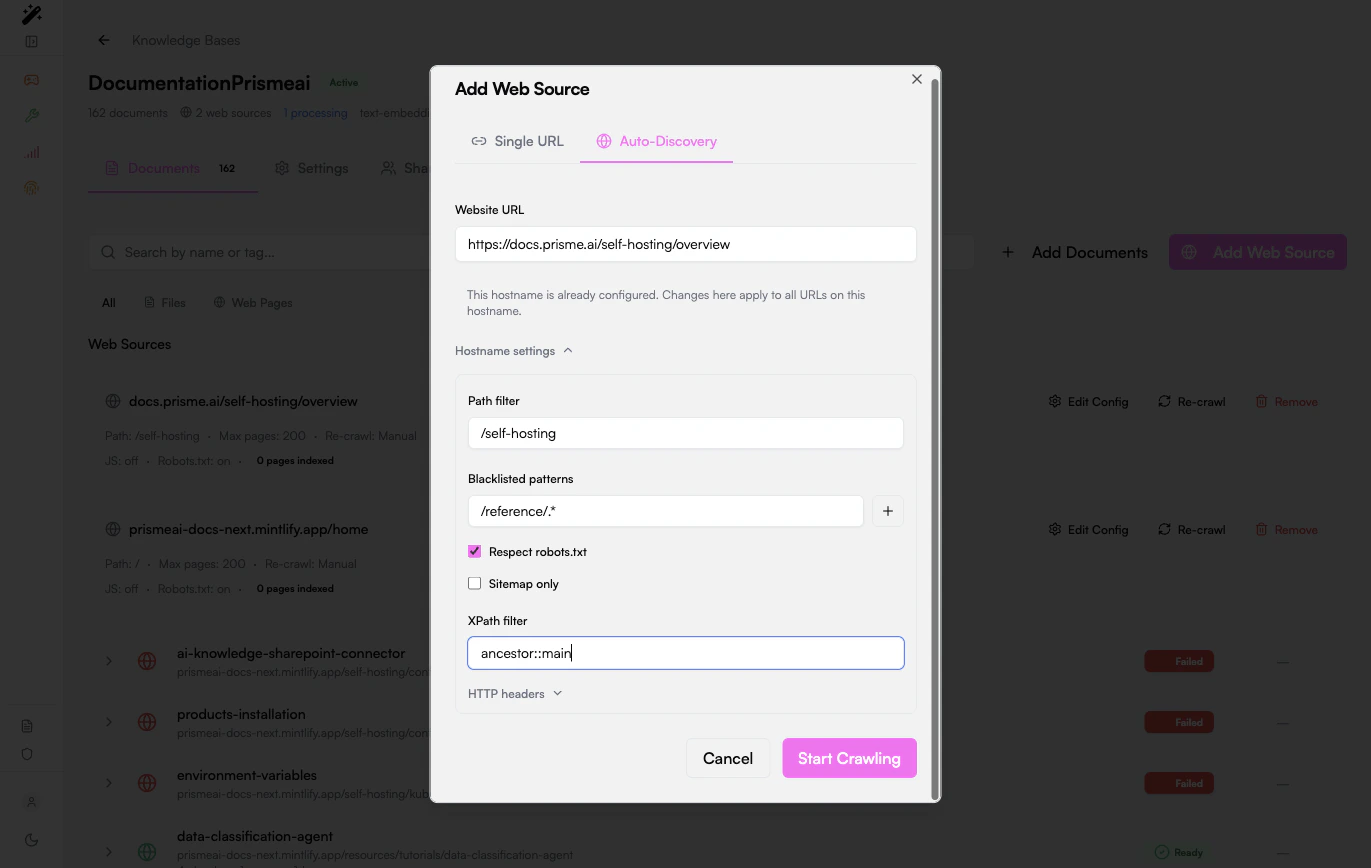
Use the hostname settings to control what gets indexed.
| Setting | What it does | Example |
| ------------------------ | -------------------------------------------- | -------------------------------------------------------- |
| **Path filter** | Limits discovery to one section of the site. | `/docs` or `/self-hosting` |
| **Blacklisted patterns** | Skips URLs that match a pattern. | `/admin/.*`, `/search.*`, `/reference/.*` |
| **Respect robots.txt** | Follows the site's crawling rules. | Keep enabled for third-party sites. |
| **Sitemap only** | Crawls only URLs listed in the sitemap. | Use for large or well-structured sites. |
| **XPath filter** | Extracts only the useful page content. | `ancestor::main` |
| **HTTP headers** | Sends custom headers to the target host. | Use for controlled internal sites that require a header. |
### Scope by path
Path filters are the first protection against noisy crawls. If the site has product docs under `/docs`, do not start from `/` unless the whole website is useful.
Good scope:
```text theme={null}
https://docs.example.com/product
Path filter: /product
```
Noisy scope:
```text theme={null}
https://www.example.com
Path filter: /
```
### Exclude low-value pages
Add blacklisted patterns for pages that create duplicates or poor retrieval context:
* Search pages
* Login and account pages
* Tag archives
* Generated API reference pages when they are not useful to the agent
* Large legal or navigation sections unrelated to the use case
### Use sitemap-only mode for large sites
If the site exposes a sitemap, sitemap-only mode is usually more predictable than link discovery. It avoids crawling pages that are linked only from navigation, filters, or dynamic widgets.
### Use an XPath filter when pages contain boilerplate
Use XPath filtering when indexed chunks contain menus, footers, cookie banners, or repeated navigation text. A common starting point is:
```text theme={null}
ancestor::main
```
This keeps text located under the page's main content area and removes most surrounding layout.
## Monitor indexing
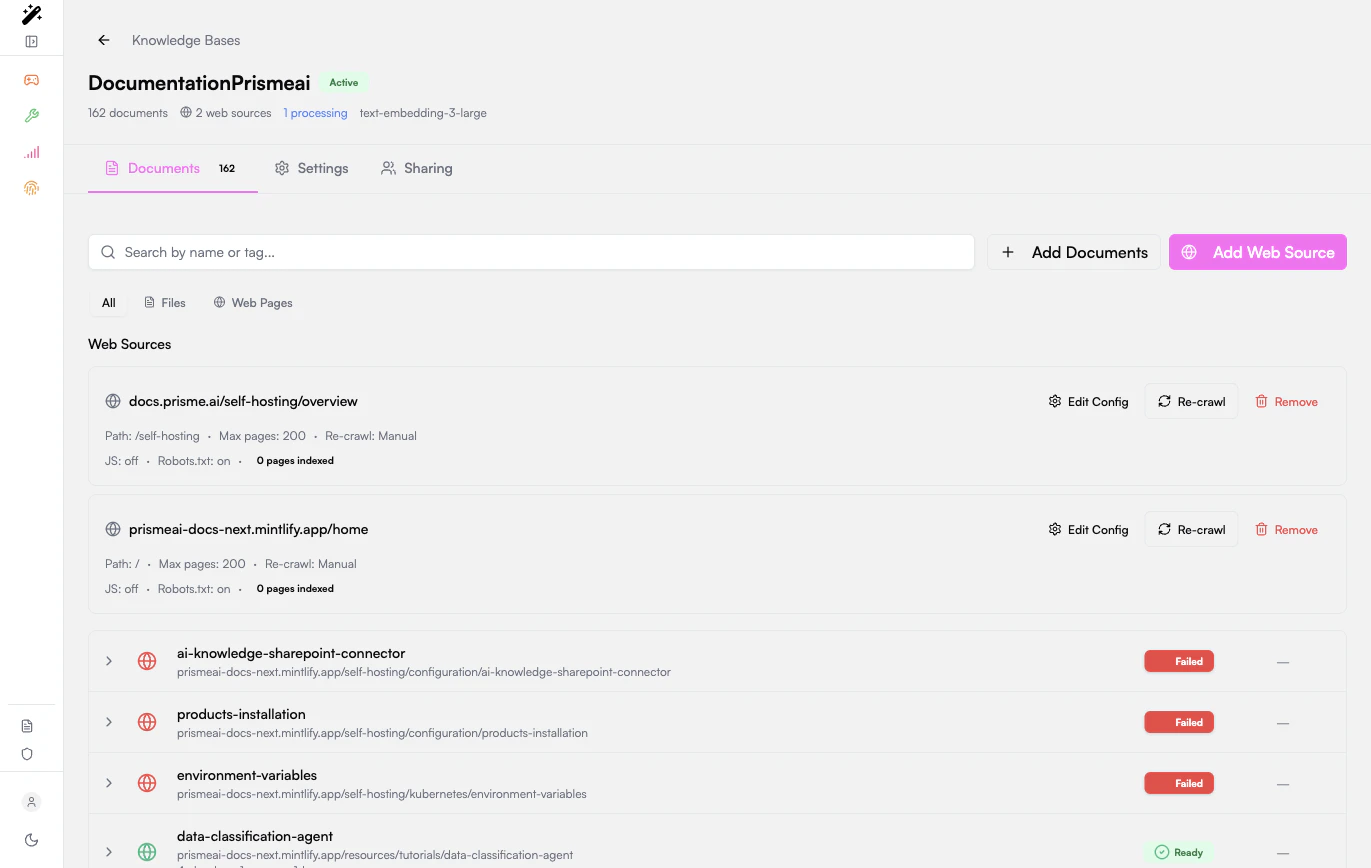
After the crawl starts, the knowledge base shows:
* The configured web source.
* The path, page limit, recrawl mode, JavaScript mode, and robots.txt mode.
* Each discovered page as a document.
* The processing status for each page.
Common statuses:
| Status | Meaning |
| -------------- | ----------------------------------------------------------------- |
| **Processing** | The page has been discovered and is being extracted or embedded. |
| **Ready** | The page is indexed and searchable. |
| **Failed** | Extraction or indexing failed. Open the row to inspect the error. |
You can use **Web Pages** to focus the document list on crawled content only.
## Keep the crawl current
Use **Re-crawl** when the source website changes and the knowledge base should refresh its pages.
Re-crawl after:
* A documentation release.
* A website migration.
* A large content update.
* Changes to path filters, blacklist patterns, XPath filters, or headers.
For large sources, start with a small path and verify the output before broadening the crawl.
## Test retrieval quality
Once a few pages are **Ready**:
1. Open the agent or test interface that uses the knowledge base.
2. Ask a precise question whose answer exists on a crawled page.
3. Check the returned sources.
4. If the right page is not retrieved, inspect the page chunks in the knowledge base.
5. Adjust path filters, XPath filters, or chunking settings, then re-crawl.
Test with questions that mention real page terms and questions that use user vocabulary. A good crawl should support both exact and semantic retrieval.
## Troubleshooting
Check that the URL is reachable from the Prisme.ai platform, the path filter is not too restrictive, robots.txt allows crawling, and the page links are normal links that the crawler can discover.
Narrow the starting URL, add a path filter, add blacklisted patterns, or switch to sitemap-only mode if the site has a sitemap.
Inspect chunks from a Ready page. If chunks contain navigation, footers, or repeated boilerplate, add an XPath filter and re-crawl.
The page may be empty, blocked, unsupported, or mostly rendered in a way the crawler cannot extract. Try a more specific page, check the page source, and add an XPath filter when useful content is present but mixed with layout.
Add blacklisted patterns for archives, query parameters, print pages, and alternate routes. Then re-crawl the source.
## Related guides
Manage uploaded files, single URLs, and crawled pages.
Tune chunking and retrieval after pages are indexed.
The crawl starts in the background. Knowledges creates one document per indexed page and processes each page like any other document: extraction, chunking, embeddings, then indexing.
## Configure the crawl
Use the hostname settings to control what gets indexed.
| Setting | What it does | Example |
| ------------------------ | -------------------------------------------- | -------------------------------------------------------- |
| **Path filter** | Limits discovery to one section of the site. | `/docs` or `/self-hosting` |
| **Blacklisted patterns** | Skips URLs that match a pattern. | `/admin/.*`, `/search.*`, `/reference/.*` |
| **Respect robots.txt** | Follows the site's crawling rules. | Keep enabled for third-party sites. |
| **Sitemap only** | Crawls only URLs listed in the sitemap. | Use for large or well-structured sites. |
| **XPath filter** | Extracts only the useful page content. | `ancestor::main` |
| **HTTP headers** | Sends custom headers to the target host. | Use for controlled internal sites that require a header. |
### Scope by path
Path filters are the first protection against noisy crawls. If the site has product docs under `/docs`, do not start from `/` unless the whole website is useful.
Good scope:
```text theme={null}
https://docs.example.com/product
Path filter: /product
```
Noisy scope:
```text theme={null}
https://www.example.com
Path filter: /
```
### Exclude low-value pages
Add blacklisted patterns for pages that create duplicates or poor retrieval context:
* Search pages
* Login and account pages
* Tag archives
* Generated API reference pages when they are not useful to the agent
* Large legal or navigation sections unrelated to the use case
### Use sitemap-only mode for large sites
If the site exposes a sitemap, sitemap-only mode is usually more predictable than link discovery. It avoids crawling pages that are linked only from navigation, filters, or dynamic widgets.
### Use an XPath filter when pages contain boilerplate
Use XPath filtering when indexed chunks contain menus, footers, cookie banners, or repeated navigation text. A common starting point is:
```text theme={null}
ancestor::main
```
This keeps text located under the page's main content area and removes most surrounding layout.
## Monitor indexing
After the crawl starts, the knowledge base shows:
* The configured web source.
* The path, page limit, recrawl mode, JavaScript mode, and robots.txt mode.
* Each discovered page as a document.
* The processing status for each page.
Common statuses:
| Status | Meaning |
| -------------- | ----------------------------------------------------------------- |
| **Processing** | The page has been discovered and is being extracted or embedded. |
| **Ready** | The page is indexed and searchable. |
| **Failed** | Extraction or indexing failed. Open the row to inspect the error. |
You can use **Web Pages** to focus the document list on crawled content only.
## Keep the crawl current
Use **Re-crawl** when the source website changes and the knowledge base should refresh its pages.
Re-crawl after:
* A documentation release.
* A website migration.
* A large content update.
* Changes to path filters, blacklist patterns, XPath filters, or headers.
For large sources, start with a small path and verify the output before broadening the crawl.
## Test retrieval quality
Once a few pages are **Ready**:
1. Open the agent or test interface that uses the knowledge base.
2. Ask a precise question whose answer exists on a crawled page.
3. Check the returned sources.
4. If the right page is not retrieved, inspect the page chunks in the knowledge base.
5. Adjust path filters, XPath filters, or chunking settings, then re-crawl.
Test with questions that mention real page terms and questions that use user vocabulary. A good crawl should support both exact and semantic retrieval.
## Troubleshooting
Check that the URL is reachable from the Prisme.ai platform, the path filter is not too restrictive, robots.txt allows crawling, and the page links are normal links that the crawler can discover.
Narrow the starting URL, add a path filter, add blacklisted patterns, or switch to sitemap-only mode if the site has a sitemap.
Inspect chunks from a Ready page. If chunks contain navigation, footers, or repeated boilerplate, add an XPath filter and re-crawl.
The page may be empty, blocked, unsupported, or mostly rendered in a way the crawler cannot extract. Try a more specific page, check the page source, and add an XPath filter when useful content is present but mixed with layout.
Add blacklisted patterns for archives, query parameters, print pages, and alternate routes. Then re-crawl the source.
## Related guides
Manage uploaded files, single URLs, and crawled pages.
Tune chunking and retrieval after pages are indexed.