> ## Documentation Index
> Fetch the complete documentation index at: https://docs.prisme.ai/llms.txt
> Use this file to discover all available pages before exploring further.
# GDPR
> Honor user data export and deletion requests — Article 15 and Article 17.
The **GDPR** page lets data controllers export or permanently delete a single user's footprint across the Insights data set: conversations, insights, agents, shares, and ratings.
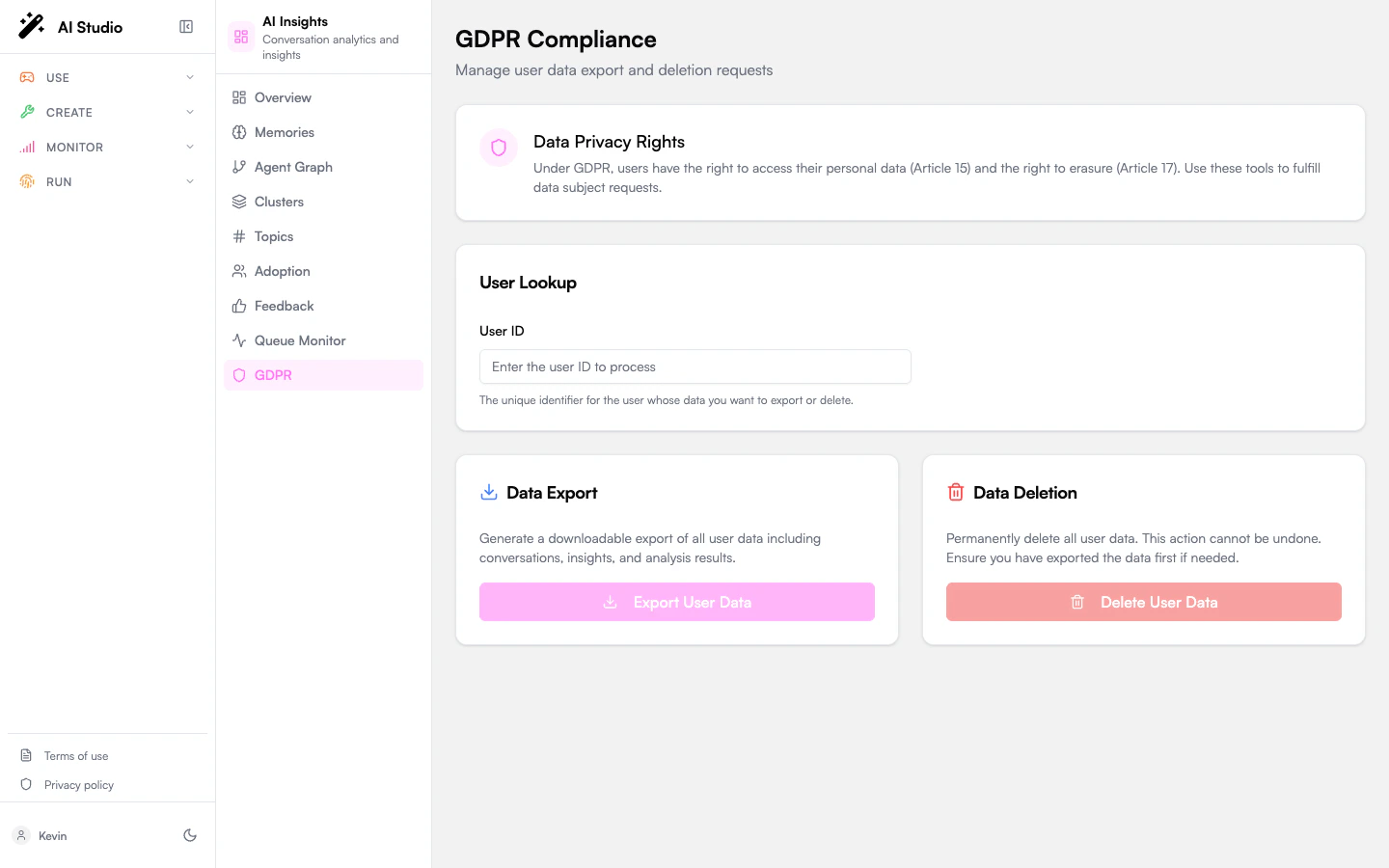 This is a destructive admin tool. Deletion is **irreversible** and affects every analyzed conversation associated with the user ID across every agent in the org.
## What's on the page
* A **Data Privacy Rights** info card with links to the GDPR articles that govern these flows.
* A **User Lookup** input where you paste the unique user ID.
* A **Data Export** card — generate a downloadable JSON dump of everything Insights knows about that user.
* A **Data Deletion** card — permanently delete that data.
* A **Result** card that appears after either action with the data counts and any partial errors.
## Export a user's data — Article 15
Right of access. Use this when a user asks for a copy of the data you hold on them.
The ID is the platform identifier you'd find in your IDP, in Builder traces (`req.user.id`), or in conversation metadata. The page validates it before querying.
The pipeline collects every conversation, insight, agent share, and rating tied to the ID and packages them into a single JSON payload.
The result shows the data counts (conversations, agents, ratings, etc.) and any partial errors — for example a single conversation the pipeline couldn't read.
Save the file. Send it to the requester via your normal secure delivery channel.
## Delete a user's data — Article 17
Right to erasure ("right to be forgotten"). Use this when a user asks to have their data permanently removed.
Deletion is permanent. There is no undo. Always run an export first if you need to keep a copy for compliance or audit reasons.
Same identifier you'd use for export.
A confirmation dialog opens with the user ID echoed back and a warning message. Read it carefully.
The dialog cancels by default — you have to actively confirm. Once you click, the pipeline runs.
The result shows what was actually deleted: conversations anonymized, agents transferred, shares deleted, ratings deleted, and any partial errors.
## What "delete" actually does
Data isn't all dropped in the same way. Insights distinguishes:
| Data type | Deletion behavior |
| ---------------------------- | ----------------------------------------------------------------------------------------------------------------------------- |
| **Conversations** | Anonymized — the message text is removed, but a placeholder record remains so analytics aggregates don't break retroactively. |
| **Insights** | The analyzed result tied to the user's conversations is removed. |
| **Agents owned by the user** | Ownership is **transferred** to a designated successor (configured per workspace), not deleted. |
| **Agent shares** | All shares granted by or to the user are deleted. |
| **Ratings** | All thumbs-up / thumbs-down feedback by the user is deleted. |
The exact mapping is configured in the workspace's retention and anonymization policy.
## Permissions
The export and delete actions are gated by an admin role granted through Governe. Without that role, both buttons are still visible but the requests are rejected at the API layer.
## What this page doesn't cover
* **Bulk deletion of inactive users.** That's a scheduled retention job, not a manual flow. See the workspace's `retention` configuration.
* **Per-conversation deletion.** Today the unit of operation is the user. To remove a single conversation, delete it from the originating product (Chat, Builder traces, etc.) — Insights will mirror that on the next aggregation cycle.
* **Cross-product GDPR.** This page only covers the Insights data set. To honor a full GDPR request you'll also need to action Builder, Knowledges, and Chat in their respective admin tools.
This is a destructive admin tool. Deletion is **irreversible** and affects every analyzed conversation associated with the user ID across every agent in the org.
## What's on the page
* A **Data Privacy Rights** info card with links to the GDPR articles that govern these flows.
* A **User Lookup** input where you paste the unique user ID.
* A **Data Export** card — generate a downloadable JSON dump of everything Insights knows about that user.
* A **Data Deletion** card — permanently delete that data.
* A **Result** card that appears after either action with the data counts and any partial errors.
## Export a user's data — Article 15
Right of access. Use this when a user asks for a copy of the data you hold on them.
The ID is the platform identifier you'd find in your IDP, in Builder traces (`req.user.id`), or in conversation metadata. The page validates it before querying.
The pipeline collects every conversation, insight, agent share, and rating tied to the ID and packages them into a single JSON payload.
The result shows the data counts (conversations, agents, ratings, etc.) and any partial errors — for example a single conversation the pipeline couldn't read.
Save the file. Send it to the requester via your normal secure delivery channel.
## Delete a user's data — Article 17
Right to erasure ("right to be forgotten"). Use this when a user asks to have their data permanently removed.
Deletion is permanent. There is no undo. Always run an export first if you need to keep a copy for compliance or audit reasons.
Same identifier you'd use for export.
A confirmation dialog opens with the user ID echoed back and a warning message. Read it carefully.
The dialog cancels by default — you have to actively confirm. Once you click, the pipeline runs.
The result shows what was actually deleted: conversations anonymized, agents transferred, shares deleted, ratings deleted, and any partial errors.
## What "delete" actually does
Data isn't all dropped in the same way. Insights distinguishes:
| Data type | Deletion behavior |
| ---------------------------- | ----------------------------------------------------------------------------------------------------------------------------- |
| **Conversations** | Anonymized — the message text is removed, but a placeholder record remains so analytics aggregates don't break retroactively. |
| **Insights** | The analyzed result tied to the user's conversations is removed. |
| **Agents owned by the user** | Ownership is **transferred** to a designated successor (configured per workspace), not deleted. |
| **Agent shares** | All shares granted by or to the user are deleted. |
| **Ratings** | All thumbs-up / thumbs-down feedback by the user is deleted. |
The exact mapping is configured in the workspace's retention and anonymization policy.
## Permissions
The export and delete actions are gated by an admin role granted through Governe. Without that role, both buttons are still visible but the requests are rejected at the API layer.
## What this page doesn't cover
* **Bulk deletion of inactive users.** That's a scheduled retention job, not a manual flow. See the workspace's `retention` configuration.
* **Per-conversation deletion.** Today the unit of operation is the user. To remove a single conversation, delete it from the originating product (Chat, Builder traces, etc.) — Insights will mirror that on the next aggregation cycle.
* **Cross-product GDPR.** This page only covers the Insights data set. To honor a full GDPR request you'll also need to action Builder, Knowledges, and Chat in their respective admin tools.