> ## Documentation Index
> Fetch the complete documentation index at: https://docs.prisme.ai/llms.txt
> Use this file to discover all available pages before exploring further.
# Feedback
> End-user thumbs up / down feedback, dislike categories, and the most recent comments.
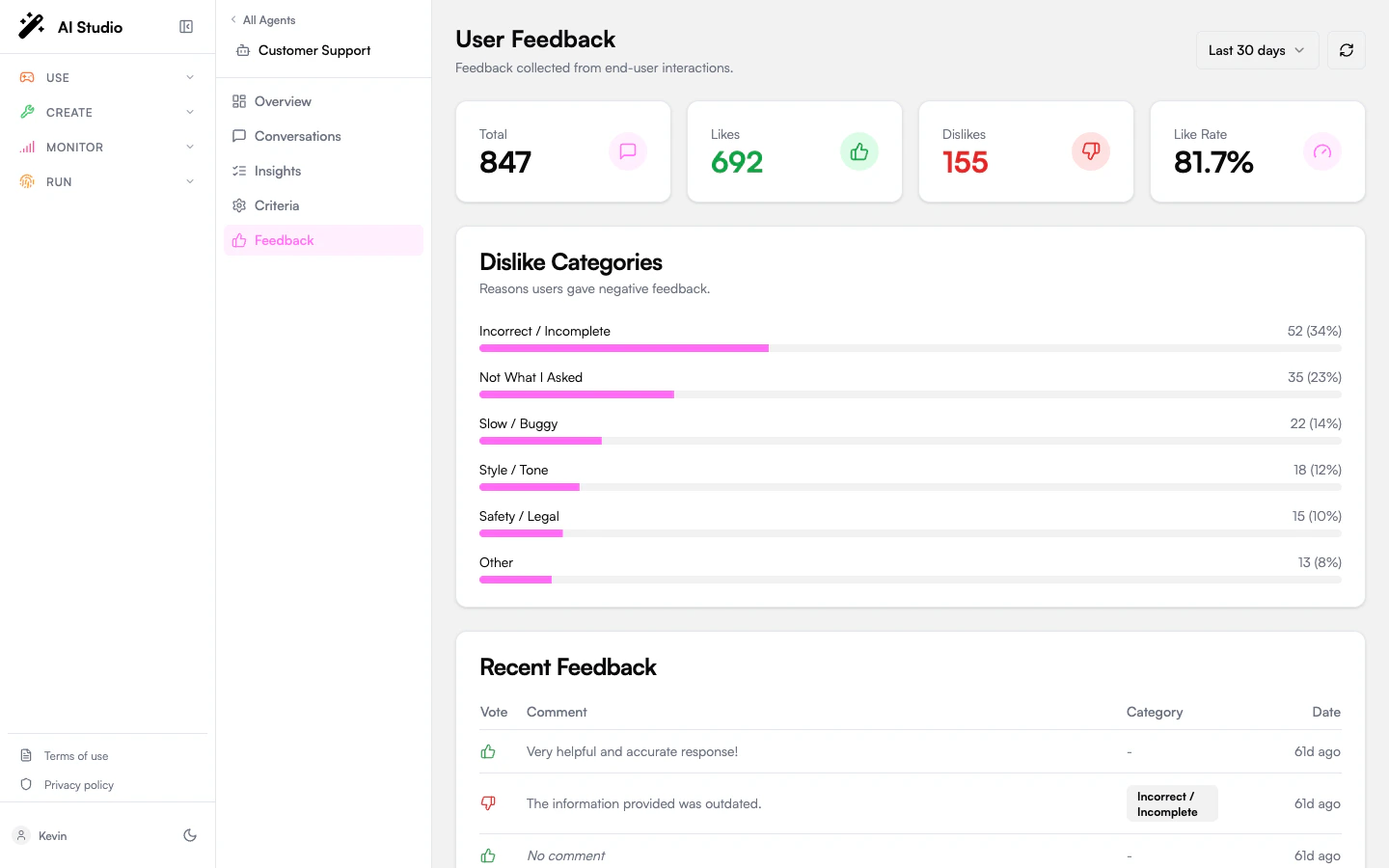
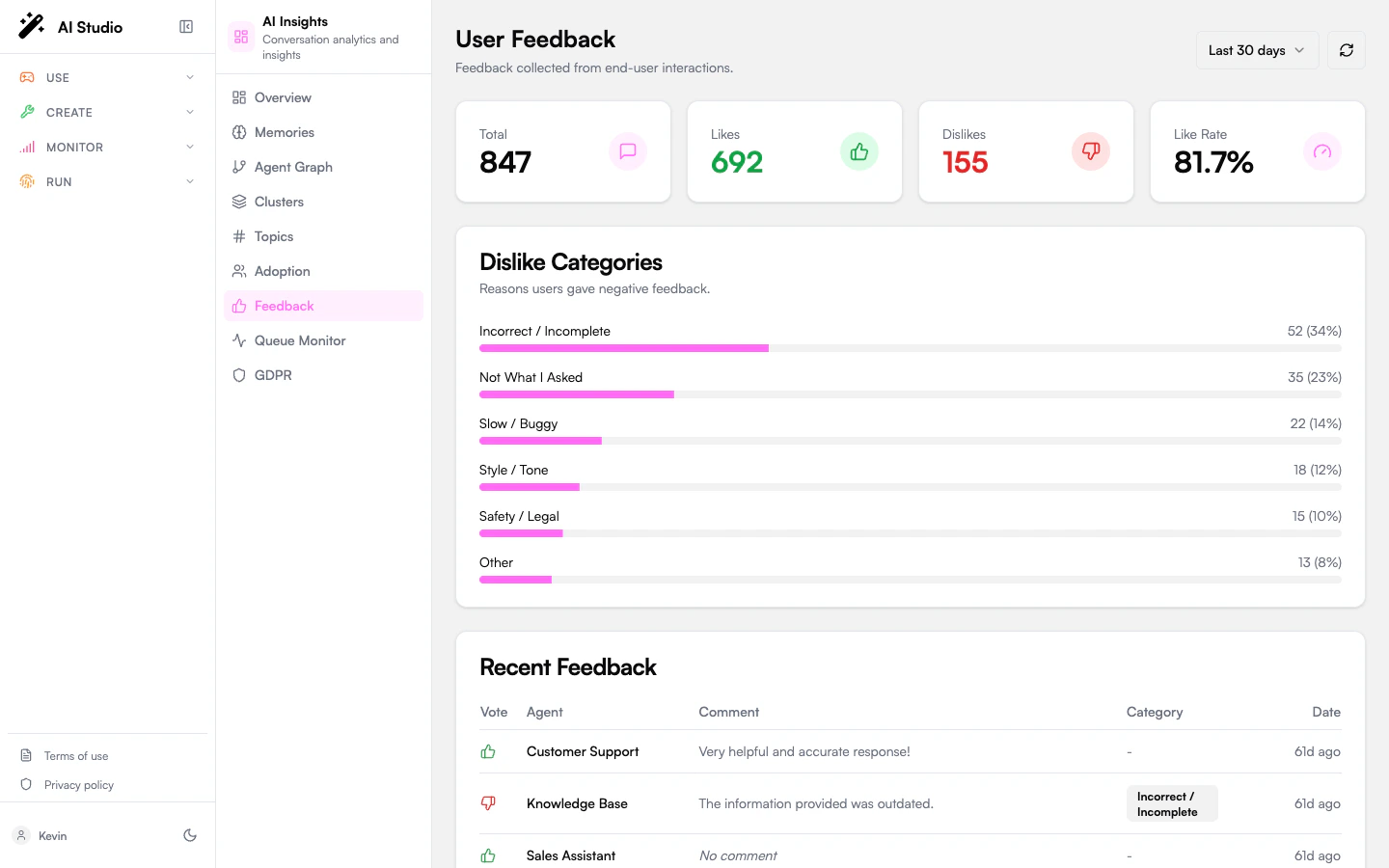
The **Feedback** page surfaces what users actually thought of your agents' replies — the like/dislike vote and any optional comment they left.
It exists in two scopes:
* **Organization Feedback** (sidebar entry at the org level) — every agent in the org.
* **Agent Feedback** (sidebar entry at the agent level, simply labeled "Feedback") — only the selected agent.
The two views share the same layout. The agent-scoped variant hides the **Agent** column.
 ## Period selector
A `7d / 30d / 90d` selector in the header scopes the data on the page. A refresh button forces a re-fetch.
## Distribution cards
Four KPI cards:
| Card | Meaning |
| ------------- | ------------------------------------------- |
| **Total** | All feedback items submitted in the period. |
| **Likes** | Thumbs-up count. |
| **Dislikes** | Thumbs-down count. |
| **Like Rate** | Likes ÷ Total, as a percentage. |
## Dislike categories
When users dislike a reply, they can optionally tag the reason. The categories card shows progress bars for each:
| Category | What it means |
| -------------------------- | --------------------------------------------------------- |
| **Incorrect / Incomplete** | The reply was wrong or missed key information. |
| **Not what I asked** | The agent answered a different question. |
| **Slow / Buggy** | Response took too long, errored, or felt broken. |
| **Style / Tone** | Phrasing felt off — too formal, too casual, robotic, etc. |
| **Safety / Legal** | The reply raised a safety or compliance concern. |
| **Other** | Reasons that don't fit the categories above. |
The card is hidden when there are no dislikes in the period.
## Recent feedback table
The most recent feedback items, paginated with a **See more** button. Columns:
| Column | Notes |
| ------------ | --------------------------------------------------------- |
| **Vote** | Thumbs-up / thumbs-down icon. |
| **Agent** | Hidden in agent scope. |
| **Comment** | The user's free-text comment, or *"No comment"* if empty. |
| **Category** | The dislike category badge (likes have none). |
| **Date** | A relative time-ago label. |
On mobile the table collapses to a card layout with the same data.
## When this page is empty
If no feedback has been collected, the page shows: *"No feedback collected yet."* You can:
* Make sure the agent's UI exposes thumbs-up / thumbs-down — Chat and the Builder UI components do this by default.
* Encourage users with prompts (*"Was this helpful?"*) inside the agent's reply.
## What to use this for
* **Quality triage.** A surge in the **Style/Tone** category often points at a system prompt change. The **Safety/Legal** category should be reviewed daily — every entry is a candidate audit case.
* **Compare against LLM-as-judge.** If your evaluation scores are high but the like rate is low, your criteria don't align with what users actually value.
* **Per-agent diffing.** Compare a known-good agent against a struggling one in the dislike category mix.
## Where to go next
Cross-reference disliked conversations with the LLM-as-judge result.
See like rate aggregated as part of the broader quality picture.
## Period selector
A `7d / 30d / 90d` selector in the header scopes the data on the page. A refresh button forces a re-fetch.
## Distribution cards
Four KPI cards:
| Card | Meaning |
| ------------- | ------------------------------------------- |
| **Total** | All feedback items submitted in the period. |
| **Likes** | Thumbs-up count. |
| **Dislikes** | Thumbs-down count. |
| **Like Rate** | Likes ÷ Total, as a percentage. |
## Dislike categories
When users dislike a reply, they can optionally tag the reason. The categories card shows progress bars for each:
| Category | What it means |
| -------------------------- | --------------------------------------------------------- |
| **Incorrect / Incomplete** | The reply was wrong or missed key information. |
| **Not what I asked** | The agent answered a different question. |
| **Slow / Buggy** | Response took too long, errored, or felt broken. |
| **Style / Tone** | Phrasing felt off — too formal, too casual, robotic, etc. |
| **Safety / Legal** | The reply raised a safety or compliance concern. |
| **Other** | Reasons that don't fit the categories above. |
The card is hidden when there are no dislikes in the period.
## Recent feedback table
The most recent feedback items, paginated with a **See more** button. Columns:
| Column | Notes |
| ------------ | --------------------------------------------------------- |
| **Vote** | Thumbs-up / thumbs-down icon. |
| **Agent** | Hidden in agent scope. |
| **Comment** | The user's free-text comment, or *"No comment"* if empty. |
| **Category** | The dislike category badge (likes have none). |
| **Date** | A relative time-ago label. |
On mobile the table collapses to a card layout with the same data.
## When this page is empty
If no feedback has been collected, the page shows: *"No feedback collected yet."* You can:
* Make sure the agent's UI exposes thumbs-up / thumbs-down — Chat and the Builder UI components do this by default.
* Encourage users with prompts (*"Was this helpful?"*) inside the agent's reply.
## What to use this for
* **Quality triage.** A surge in the **Style/Tone** category often points at a system prompt change. The **Safety/Legal** category should be reviewed daily — every entry is a candidate audit case.
* **Compare against LLM-as-judge.** If your evaluation scores are high but the like rate is low, your criteria don't align with what users actually value.
* **Per-agent diffing.** Compare a known-good agent against a struggling one in the dislike category mix.
## Where to go next
Cross-reference disliked conversations with the LLM-as-judge result.
See like rate aggregated as part of the broader quality picture.