> ## Documentation Index
> Fetch the complete documentation index at: https://docs.prisme.ai/llms.txt
> Use this file to discover all available pages before exploring further.
# Clusters
> Agents grouped by similarity, with their shared tools and the agents that don't fit anywhere.
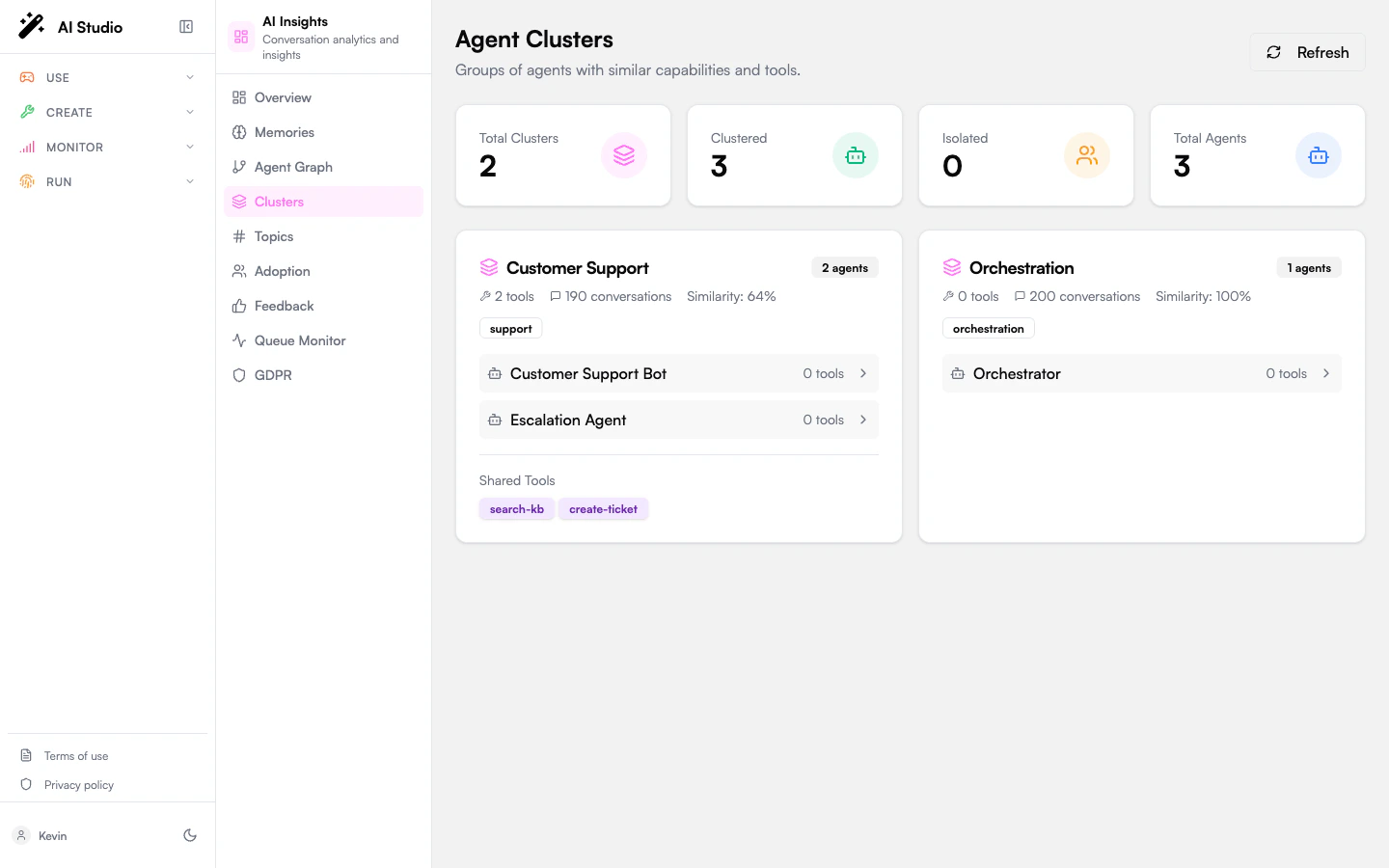
Clusters formalizes the similarity signal you can already see on the [Agent network](/products/ai-insights/graph). It groups agents whose conversation patterns and tool usage overlap above a threshold, and surfaces the **isolated agents** that don't fit into any cluster.
 ## Stats cards
Four KPI cards:
| Card | Meaning |
| -------------------- | --------------------------------------------- |
| **Total Clusters** | Number of similarity-based clusters detected. |
| **Clustered Agents** | Agents that fall into at least one cluster. |
| **Isolated Agents** | Agents that don't fit into any cluster. |
| **Total Agents** | All published agents in the org. |
A **Refresh** button next to the cards re-runs the cluster computation.
## Cluster cards
Each cluster gets its own card with:
* A title and an **agent count** badge.
* A description summarizing the cluster — number of tools, conversations, and overall similarity percentage.
* A list of **categories** the agents in the cluster share, as badges.
* The **agents** in the cluster — name, category, tool count, average score. Click an agent to enter its scoped view.
* A **Shared Tools** section listing the tools used by multiple agents in the cluster (capped at 8 visible, with a `+N more` pill).
## Isolated Agents
A separate card lists agents that don't fit into any cluster — typically because their conversation pattern or tool stack is unique. The grid is clickable; pick any agent to enter its scoped view.
Isolated agents aren't necessarily wrong — a one-of-a-kind compliance agent or a specialized internal tool will often sit alone. But if you have many of them, that's a hint that your fleet is fragmented.
## How clusters are formed
The cluster algorithm groups agents whose:
* **Conversation patterns** (topics, intents, message structure) overlap.
* **Tool usage** overlaps.
* Combined similarity score exceeds the cluster threshold.
The exact threshold is workspace-configurable; the default produces clusters that are tight enough to suggest real consolidation opportunities, loose enough to include legitimate variants.
## What to use this page for
* **Consolidation candidates.** A cluster with multiple agents doing nearly the same thing is a candidate for merging. The shared-tools list shows what they have in common.
* **Coverage gaps.** A category with no cluster (or only one agent) means a domain is under-served.
* **Onboarding clarity.** When a new team launches an agent that overlaps an existing cluster, you'll see the new arrival join the cluster on the next refresh.
## Empty state
When the org has no published agents, the page shows: *"No clusters found. Clusters are formed based on agent similarity."*
## Where to go next
Visualize similarity edges and node neighborhoods interactively.
Click any agent in a cluster to drill in.
## Stats cards
Four KPI cards:
| Card | Meaning |
| -------------------- | --------------------------------------------- |
| **Total Clusters** | Number of similarity-based clusters detected. |
| **Clustered Agents** | Agents that fall into at least one cluster. |
| **Isolated Agents** | Agents that don't fit into any cluster. |
| **Total Agents** | All published agents in the org. |
A **Refresh** button next to the cards re-runs the cluster computation.
## Cluster cards
Each cluster gets its own card with:
* A title and an **agent count** badge.
* A description summarizing the cluster — number of tools, conversations, and overall similarity percentage.
* A list of **categories** the agents in the cluster share, as badges.
* The **agents** in the cluster — name, category, tool count, average score. Click an agent to enter its scoped view.
* A **Shared Tools** section listing the tools used by multiple agents in the cluster (capped at 8 visible, with a `+N more` pill).
## Isolated Agents
A separate card lists agents that don't fit into any cluster — typically because their conversation pattern or tool stack is unique. The grid is clickable; pick any agent to enter its scoped view.
Isolated agents aren't necessarily wrong — a one-of-a-kind compliance agent or a specialized internal tool will often sit alone. But if you have many of them, that's a hint that your fleet is fragmented.
## How clusters are formed
The cluster algorithm groups agents whose:
* **Conversation patterns** (topics, intents, message structure) overlap.
* **Tool usage** overlaps.
* Combined similarity score exceeds the cluster threshold.
The exact threshold is workspace-configurable; the default produces clusters that are tight enough to suggest real consolidation opportunities, loose enough to include legitimate variants.
## What to use this page for
* **Consolidation candidates.** A cluster with multiple agents doing nearly the same thing is a candidate for merging. The shared-tools list shows what they have in common.
* **Coverage gaps.** A category with no cluster (or only one agent) means a domain is under-served.
* **Onboarding clarity.** When a new team launches an agent that overlaps an existing cluster, you'll see the new arrival join the cluster on the next refresh.
## Empty state
When the org has no published agents, the page shows: *"No clusters found. Clusters are formed based on agent similarity."*
## Where to go next
Visualize similarity edges and node neighborhoods interactively.
Click any agent in a cluster to drill in.