> ## Documentation Index
> Fetch the complete documentation index at: https://docs.prisme.ai/llms.txt
> Use this file to discover all available pages before exploring further.
# Agent overview
> The per-agent dashboard — analyzed volume, score, resolution, sentiment, and the most recent insights.
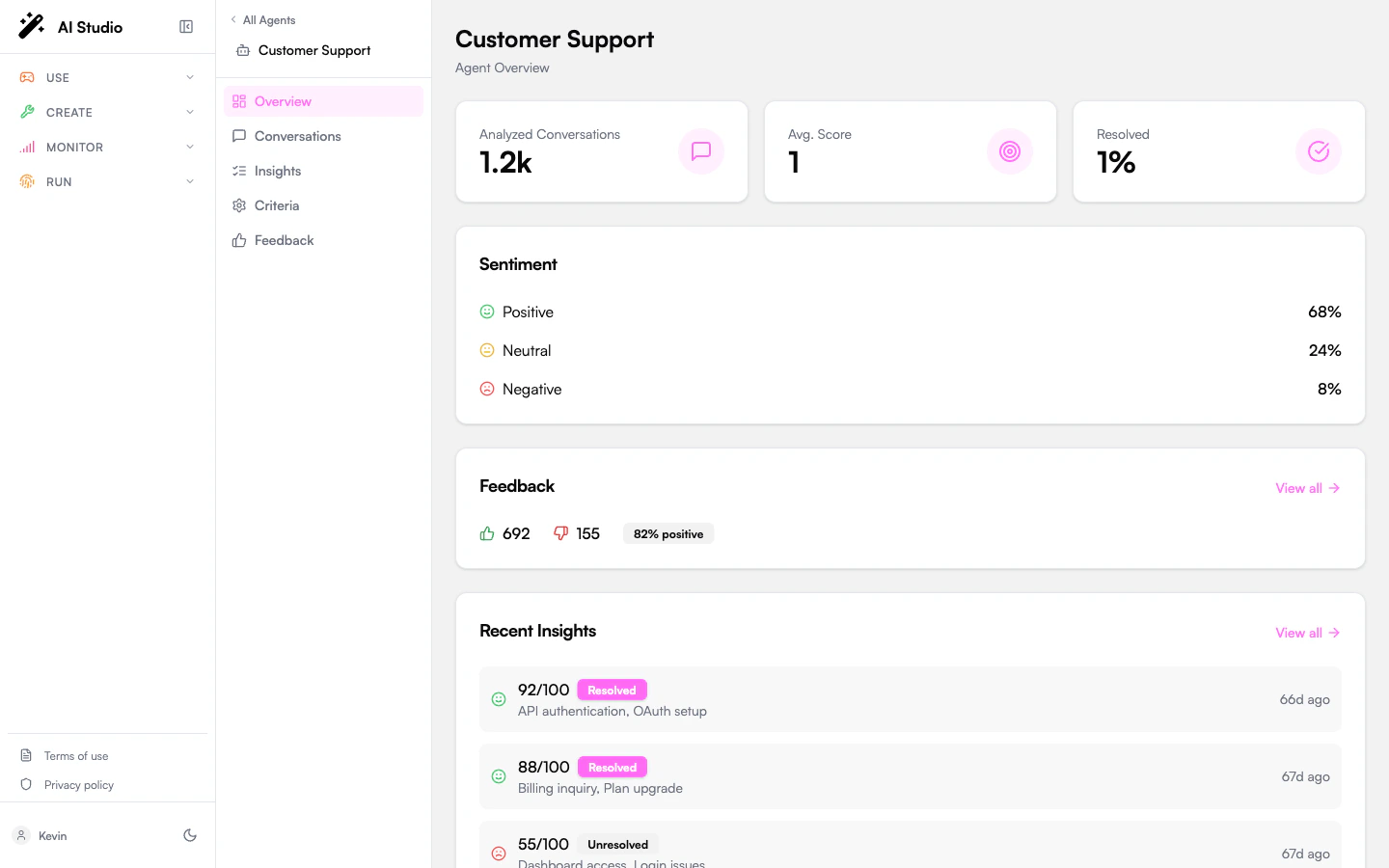
When you click an agent on the Insights dashboard (or any agent card elsewhere), the sidebar swaps to the agent context and lands on **Overview**. This view answers a single question: *how is this one agent doing?*
 ## Summary cards
Three KPI cards summarize the agent's analyzed conversations:
| Card | What it means |
| -------------------------- | ---------------------------------------------------------------------------------------------------------------------------------------------------------------------------------------------------------------------- |
| **Analyzed Conversations** | Total conversations Insights has produced an analysis for. Compare it against the agent's total volume in [Conversations](/products/ai-insights/conversations) to gauge analysis coverage. |
| **Average Score** | Mean evaluation score (0–100) across all analyzed conversations. The score is the weighted aggregate of every criterion answer; see [Evaluation criteria](/products/ai-insights/criteria) for how weights are applied. |
| **Resolution Rate** | Share of analyzed conversations where the LLM judged the user's issue as resolved. Driven by the `resolution` Yes/No criterion (default or custom). |
## Sentiment
A three-row breakdown of overall conversation sentiment: **Positive**, **Neutral**, **Negative**, expressed as percentages. Sentiment is determined per conversation by the analysis pass — see [Insights](/products/ai-insights/insights) for the per-conversation detail.
## Feedback summary
If users have submitted feedback (thumbs up / down) on this agent's conversations, a summary card appears with **Likes**, **Dislikes**, and **Like Rate**. Click **View all** to open the agent-scoped Feedback page. The card is hidden when the agent has no feedback yet.
## Recent Insights
The most recent analyzed conversations for this agent. Each row shows:
* The evaluation score (0–100), color-coded (≥80 green, ≥60 yellow, \<60 red).
* A **Resolved** or **Unresolved** badge.
* The topics extracted from the conversation.
* A relative timestamp ("2h ago").
Click **View all** to jump to the [Insights](/products/ai-insights/insights) page for the full filterable list.
## When this view is empty
If the agent has no analyzed conversations:
* The summary cards show zeros and the Recent Insights list is empty.
* Open [Conversations](/products/ai-insights/conversations) to trigger analysis on existing conversations, or wait for the batch pass to pick them up automatically once they go inactive.
## Where to go next
Review every conversation, filter by status, and trigger analysis.
Customize how this agent's conversations are scored.
Per-conversation detail with summary, key moments, and token usage.
Likes, dislikes, and dislike categories for this agent.
## Summary cards
Three KPI cards summarize the agent's analyzed conversations:
| Card | What it means |
| -------------------------- | ---------------------------------------------------------------------------------------------------------------------------------------------------------------------------------------------------------------------- |
| **Analyzed Conversations** | Total conversations Insights has produced an analysis for. Compare it against the agent's total volume in [Conversations](/products/ai-insights/conversations) to gauge analysis coverage. |
| **Average Score** | Mean evaluation score (0–100) across all analyzed conversations. The score is the weighted aggregate of every criterion answer; see [Evaluation criteria](/products/ai-insights/criteria) for how weights are applied. |
| **Resolution Rate** | Share of analyzed conversations where the LLM judged the user's issue as resolved. Driven by the `resolution` Yes/No criterion (default or custom). |
## Sentiment
A three-row breakdown of overall conversation sentiment: **Positive**, **Neutral**, **Negative**, expressed as percentages. Sentiment is determined per conversation by the analysis pass — see [Insights](/products/ai-insights/insights) for the per-conversation detail.
## Feedback summary
If users have submitted feedback (thumbs up / down) on this agent's conversations, a summary card appears with **Likes**, **Dislikes**, and **Like Rate**. Click **View all** to open the agent-scoped Feedback page. The card is hidden when the agent has no feedback yet.
## Recent Insights
The most recent analyzed conversations for this agent. Each row shows:
* The evaluation score (0–100), color-coded (≥80 green, ≥60 yellow, \<60 red).
* A **Resolved** or **Unresolved** badge.
* The topics extracted from the conversation.
* A relative timestamp ("2h ago").
Click **View all** to jump to the [Insights](/products/ai-insights/insights) page for the full filterable list.
## When this view is empty
If the agent has no analyzed conversations:
* The summary cards show zeros and the Recent Insights list is empty.
* Open [Conversations](/products/ai-insights/conversations) to trigger analysis on existing conversations, or wait for the batch pass to pick them up automatically once they go inactive.
## Where to go next
Review every conversation, filter by status, and trigger analysis.
Customize how this agent's conversations are scored.
Per-conversation detail with summary, key moments, and token usage.
Likes, dislikes, and dislike categories for this agent.