> ## Documentation Index
> Fetch the complete documentation index at: https://docs.prisme.ai/llms.txt
> Use this file to discover all available pages before exploring further.
# Capabilities Catalog
> Manage MCP servers, tools, guardrails, skills, and memory providers
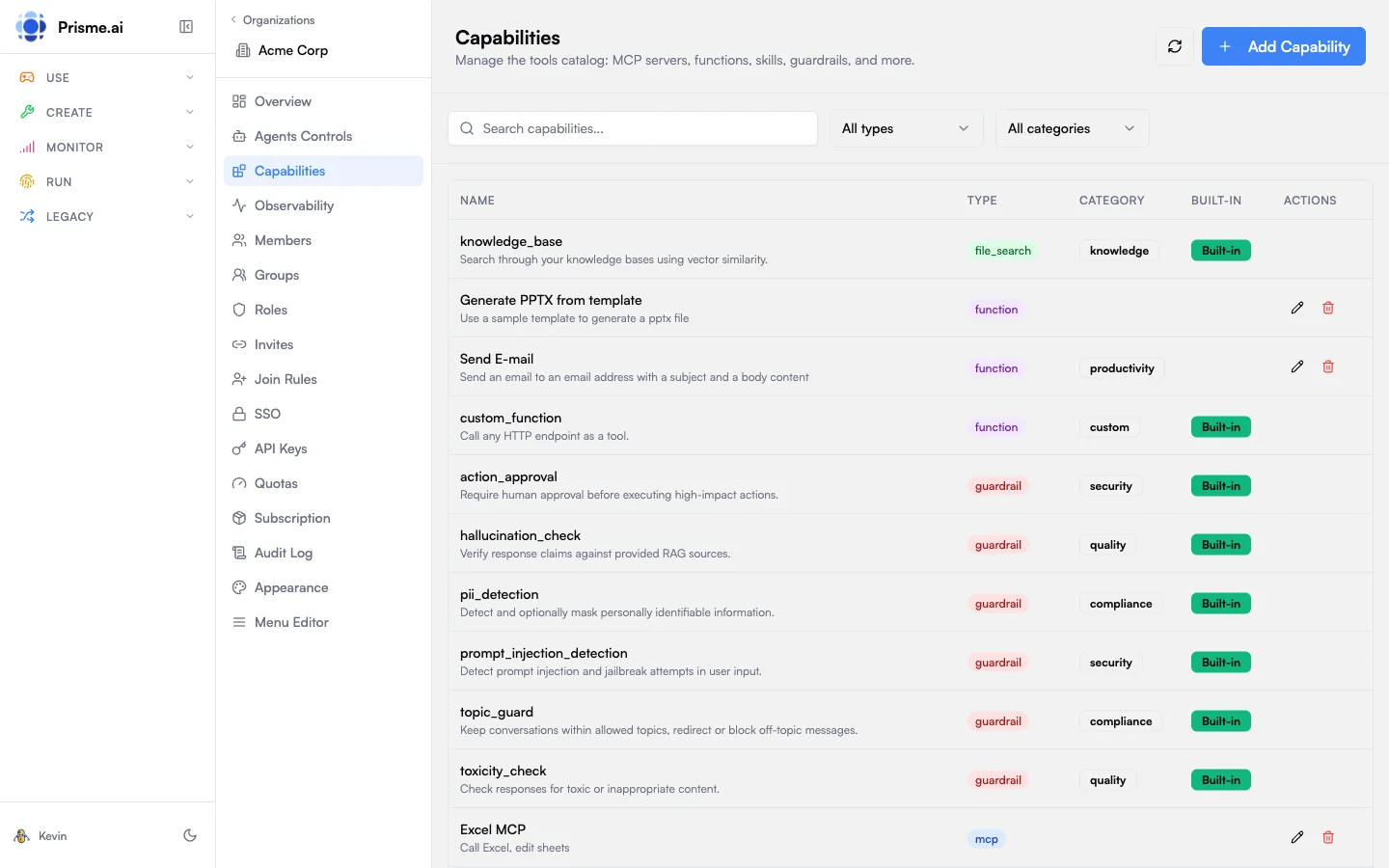 The Capabilities Catalog is a centralized registry of tools and capabilities available to AI agents in your organization. It includes MCP servers, functions, file search, skills, guardrails, memory providers, and sub-agents.
## Capability Types
| Type | Description |
| --------------- | ---------------------------------------------------------------- |
| **MCP** | Model Context Protocol servers providing tools via SSE/WebSocket |
| **Function** | Custom HTTP endpoints callable as tools |
| **File Search** | Knowledge base search using vector stores |
| **Skill** | Reusable instruction sets for agents |
| **Guardrail** | Input/output validation and safety filters |
| **Memory** | Conversation and long-term memory providers |
| **Sub-Agent** | Other agents that can be invoked as tools |
## Categories
Organize capabilities into functional categories:
| Category | Use Case |
| ---------------- | ------------------------------------ |
| **Search** | Web search, document search, RAG |
| **Productivity** | Calendar, email, task management |
| **Security** | Authentication, authorization checks |
| **Compliance** | PII detection, content filtering |
| **Knowledge** | Knowledge bases, documentation |
| **Custom** | Organization-specific tools |
| **Store** | App store integrations |
| **Generic** | General-purpose utilities |
| **Context** | Context injection and enrichment |
## MCP Servers
[Model Context Protocol (MCP)](https://modelcontextprotocol.io) servers expose tools to AI agents through a standardized interface.
### Adding an MCP Server
1. Go to **Capabilities** in the sidebar
2. Click **Add Capability**
3. Select type **MCP**
4. Configure:
| Field | Description |
| --------------------- | ----------------------------- |
| **Entry Name** | Display name for this server |
| **Server Name** | Identifier used in tool calls |
| **SSE/WebSocket URL** | Server endpoint URL |
| **Auth Headers** | Authentication headers (JSON) |
| **Scope** | Access scope (`org`, `user`) |
5. Click **Create**
### Example Configuration
```json theme={null}
{
"name": "company-tools",
"server": "https://mcp.acme.com/sse",
"headers": {
"Authorization": "Bearer {{secrets.MCP_TOKEN}}"
},
"scope": "org"
}
```
The example above uses a **single, org-wide credential** baked into the headers — every end user reaches the MCP with the same token. Use this when access is shared.
When each end user must log in personally — OAuth (Notion, GitHub, Outlook…) or a per-user API key — switch to the **per-user authentication** pattern below.
## Per-user authentication
Add an `auth` block to the capability so the platform handles connect / disconnect / status checks per end user. Two patterns are supported:
| Pattern | Use when |
| ----------------------------------- | ----------------------------------------------------------------------------------------------------------------------------------- |
| **OAuth** (`auth.type: "oauth"`) | The third party offers an OAuth flow. Each user is redirected to the provider's consent page. |
| **JSON auth** (`auth.type: "json"`) | The third party requires a static credential (API key, personal token) that the end user supplies in a small form. Stored per user. |
### Required `auth` fields
| Field | Description |
| --------------------- | ---------------------------------------------------------------------------------------------------------------------------- |
| `auth.type` | `oauth` or `json` |
| `auth.status_url` | Endpoint hit per turn to check if the current user is connected. Must return `{ connected: boolean }`. |
| `auth.connect_url` | Where Chat sends the user to log in. OAuth → provider's authorize URL. JSON → a Prisme.ai page that captures the credential. |
| `auth.disconnect_url` | Where the user is sent to revoke (deletes the per-user credential). |
The capability hosts these three endpoints itself (typically as a Builder workspace alongside the MCP server). The platform never stores the credential in agent-factory or in the agent — only inside the capability's own workspace.
### Example: MCP server with JSON auth
```json theme={null}
{
"name": "finance_mcp",
"display_name": "Finance MCP",
"description": "Internal finance API exposed as MCP. Read-only.",
"icon_url": "https://internal.acme.com/icons/finance.svg",
"type": "mcp",
"category": "custom",
"auth": {
"type": "json",
"status_url": "{{global.apiUrl}}/workspaces/slug:finance-mcp/webhooks/auth/status",
"connect_url": "{{global.apiUrl}}/workspaces/slug:finance-mcp/webhooks/auth/connect",
"disconnect_url": "{{global.apiUrl}}/workspaces/slug:finance-mcp/webhooks/auth/disconnect"
},
"config_schema": {
"type": "object",
"properties": {
"name": { "type": "string", "title": "Tool name", "default": "finance_mcp" },
"server": { "type": "string", "title": "Server URL", "default": "https://finance.internal/mcp" }
},
"required": ["name", "server"]
}
}
```
`config_schema` defines the fields the **Agent Builder** fills in when adding the capability to an agent in the **Agent Creator** product (server URL, tool name, scope…). `config_schema` is **not** for end users — never use it for credentials.
### Implementing the three webhooks
Each `auth.*_url` points at one webhook automation in the capability's own workspace. Here is the minimum each must do, mirroring the SharePoint MCP reference implementation:
#### `status_url` — am I connected?
Triggered by Chat per turn whenever the agent might call the tool. Reads the **current end user's** stored credential and returns whether it's still valid.
```yaml theme={null}
slug: checkAuthStatus
when:
endpoint: true
do:
- set:
name: connected
value: false
- conditions:
'{{user.myservice.oauth.expiresAt}} > {{run.date}}':
- set:
name: connected
value: true
output:
connected: '{{connected}}'
```
Must return `{ "connected": true | false }`. Add anything else you want to surface to the UI (`expiresAt`, `email`, etc.) — Chat ignores unknown fields safely.
#### `connect_url` — start the flow
For OAuth, generate PKCE + state and redirect to the provider. For JSON auth, render or redirect to a small form that collects the credential.
```yaml theme={null}
slug: initiateOAuth
when:
endpoint: true
do:
- comment: Generate PKCE + CSRF state, store in user scope for the callback
- Custom Code.run function:
function: generatePKCE
output: pkce
- set:
name: user.myservice.oauthPending
scope: user
value:
codeVerifier: '{{pkce.codeVerifier}}'
state: '{{pkce.state}}'
- comment: Redirect browser to the provider's authorize endpoint
- set:
name: $http
value:
headers:
Content-Type: text/html
- set:
name: output
value:
output: '{{output}}'
```
The OAuth callback (a separate webhook, e.g. `oauthCallback`) exchanges the auth code for tokens and stores them via the `secrets` module with `scope: user`:
```yaml theme={null}
- run:
module: secrets
function: set
parameters:
name: my_access_token
scope: user
value: '{{tokenResponse.access_token}}'
```
#### `disconnect_url` — revoke
Deletes the per-user secret and any state stored in user scope:
```yaml theme={null}
slug: disconnectOAuth
when:
endpoint: true
do:
- try:
do:
- run:
module: secrets
function: delete
parameters:
name: my_access_token
scope: user
catch: []
- delete:
name: user.myservice.oauth
output:
disconnected: true
```
Reference: full SharePoint MCP implementation in the `sharepoint-mcp` workspace template.
## Where credentials live
End-user credentials never leave the capability's own workspace. Two layers exist, depending on whose credential it is:
### Per-user credentials (the user's OAuth token, personal API key)
* Stored via the **`secrets` module with `scope: user`** — encrypted at rest, isolated per user, only readable from inside the capability's own workspace.
* The MCP server's tool implementations are the **only code allowed to read these secrets**. They retrieve the calling user's token at call time, attach it to the outbound API request, and discard it.
* **The agent never sees the user's token or credential.** It only sees the tool's response (or the structured error if `connected: false`). Likewise, agent-factory, secure-chat, and the LLM gateway have no read access — they only know whether the user is connected, never what the credential is.
### Infrastructure credentials (the OAuth client secret, upstream API keys, webhook signing keys)
These are **not user-specific** — they belong to the capability itself (e.g. the OAuth `client_secret` issued by Microsoft for your SharePoint app, the static API token your MCP uses to talk to its upstream).
* Pulled from the platform's **infrastructure secret store** — Azure Key Vault, AWS Secrets Manager, Google Secret Manager, or HashiCorp Vault, depending on your deployment.
* Referenced inside automations as `{{secrets.YOUR_SECRET_NAME}}` and rotated centrally by infra.
* Same containment rule: only the capability's own workspace can resolve them. They never appear in agent context, prompts, or logs.
Use the right layer for the right credential:
| Credential | Where it lives | Lifecycle |
| ------------------------------------------------------- | ---------------------------------------------------------------------------------------- | ----------------------------------------- |
| User's OAuth access/refresh token | `secrets` module, `scope: user` | Created on Connect, deleted on Disconnect |
| User's personal API key (JSON auth) | `secrets` module, `scope: user` | Same |
| OAuth client secret, provider master keys, signing keys | Infra secret store (Key Vault / Secrets Manager / Vault), referenced via `{{secrets.X}}` | Rotated by infra, not the end user |
This matters when picking which provider gets a per-user MCP: you trust the **capability workspace's code**, not the agent or the LLM, with the credential.
## Limiting what the agent can do — service accounts
Per-user authentication controls the **third party** side (which user the MCP acts as). To limit the **platform** side (what the agent itself can do across Prisme.ai workspaces), each agent runs under its own **service account** with a role.
* Every agent gets a service account on first call, slug `agentfactory_{agent_id}`.
* The role defaults to `agent-standard`. Org admins can set a different default in Agent Creator's `defaultAgentSARoleSlug` config, or the Agent Builder can override per-agent.
* The service account's permissions decide which workspaces and actions the agent can reach — so an agent with a "read-only" SA cannot mutate other workspaces' data, even if its own MCP could.
**Two-layer mental model**:
| Concern | Mechanism | Configured by |
| ------------------------------------------------------------------- | ---------------------------------------------- | ------------------------------------------ |
| What can the agent **do on behalf of the user** in the third party? | OAuth / JSON auth credentials, scoped per user | End User (Connect button in Store or Chat) |
| What can the agent **do on the Prisme.ai platform**? | Agent's service account role | Org admin / Agent Builder |
The two layers compose: an agent with a "read-only" SA can still write to a third-party API if the user's OAuth token has write scopes — and vice versa.
### What happens next
* **Agent Builder** (in the **Agent Creator** product) picks the capability from the catalog and configures the `config_schema` fields. They never see end-user credentials. → see [Agent Capabilities](/products/agent-factory/capabilities).
* **End User** runs the agent through the **Store** or through a dedicated **Chat** (Secure Chat). They are prompted to connect their personal account — proactively from the agent home view, or just-in-time when the agent calls the tool. The connect button opens the provider's flow (or the JSON form), then the agent resumes automatically. → see [MCP Connections & OAuth](/products/ai-securechat/mcp-connections).
## Functions
Functions are custom HTTP endpoints that agents can call as tools.
### Adding a Function
1. Click **Add Capability**
2. Select type **Function**
3. Configure:
| Field | Description |
| ----------------- | ------------------------------------- |
| **Function Name** | Name used in tool calls |
| **Description** | What the function does |
| **Endpoint URL** | HTTP endpoint to call |
| **Parameters** | JSON Schema defining input parameters |
| **HTTP Headers** | Headers to include in requests |
### Example Configuration
```json theme={null}
{
"name": "lookup_customer",
"description": "Look up customer information by ID",
"url": "https://api.acme.com/customers/lookup",
"parameters": {
"type": "object",
"properties": {
"customer_id": {
"type": "string",
"description": "Customer ID to look up"
}
},
"required": ["customer_id"]
}
}
```
## File Search
Connect vector stores for knowledge base search.
### Adding File Search
1. Click **Add Capability**
2. Select type **File Search**
3. Configure:
| Field | Description |
| ------------------- | -------------------------------- |
| **Tool Name** | Usually `knowledge_base` |
| **Vector Store ID** | ID of the vector store to search |
File search integrates with [Knowledges](/products/ai-knowledge/overview) vector stores.
## Skills
Skills are reusable instruction sets that modify agent behavior.
### Adding a Skill
1. Click **Add Capability**
2. Select type **Skill**
3. Configure:
| Field | Description |
| ----------------- | -------------------------------- |
| **Skill Name** | Identifier for the skill |
| **Short Purpose** | One-sentence description |
| **Instructions** | Detailed instructions (Markdown) |
### Example Skill
**Name**: `summarize`
**Purpose**: Summarize long documents into key points
**Instructions**:
```markdown theme={null}
When asked to summarize content:
1. Read the entire document first
2. Identify the main thesis or purpose
3. Extract 3-5 key points
4. Present as a bulleted list
5. Keep summary under 200 words
```
## Guardrails
Guardrails validate inputs, outputs, or actions to ensure safety and compliance.
### Guardrail Types
| Type | When Applied |
| ---------- | ----------------------------------- |
| **Input** | Before processing user messages |
| **Output** | Before returning responses to users |
| **Action** | Before executing tool calls |
### Adding a Guardrail
1. Click **Add Capability**
2. Select type **Guardrail**
3. Configure:
| Field | Description |
| ------------------ | ------------------------- |
| **Guardrail Name** | Identifier |
| **Guardrail Type** | input, output, or action |
| **Description** | What the guardrail checks |
| **Endpoint URL** | Validation endpoint |
### Example Guardrail
```json theme={null}
{
"name": "pii_filter",
"guardrail_type": "output",
"description": "Detect and redact PII in responses",
"url": "https://guardrails.acme.com/pii-check"
}
```
## Memory Providers
Memory providers store conversation history and long-term context.
### Adding Memory
1. Click **Add Capability**
2. Select type **Memory**
3. Configure:
| Field | Description |
| --------------- | --------------------------------- |
| **Memory Name** | Identifier |
| **Memory Type** | `conversation`, `long_term`, etc. |
| **Description** | What this memory stores |
## Sub-Agents
Sub-agents are other agents that can be invoked as tools, enabling agent composition.
### Adding a Sub-Agent
1. Click **Add Capability**
2. Select type **Sub-Agent**
3. Configure:
| Field | Description |
| --------------- | -------------------------------- |
| **Agent** | Select from published agents |
| **Name** | Override display name (optional) |
| **Description** | What this agent does |
## Built-in vs Custom
Capabilities are marked as:
* **Built-in**: Provided by the platform, cannot be edited or deleted
* **Custom**: Created by your organization, fully editable
## Filtering & Search
Use the toolbar to find capabilities:
* **Search**: Filter by name or description
* **Type**: Filter by capability type (MCP, Function, etc.)
* **Category**: Filter by functional category
## Best Practices
Use clear, action-oriented names for tools
Store credentials in secrets, reference as `{{secrets.KEY}}`
Provide detailed descriptions in JSON Schema
Verify capabilities work before enabling for all agents
## Next Steps
Control which models agents can use
Monitor capability usage and errors
The Capabilities Catalog is a centralized registry of tools and capabilities available to AI agents in your organization. It includes MCP servers, functions, file search, skills, guardrails, memory providers, and sub-agents.
## Capability Types
| Type | Description |
| --------------- | ---------------------------------------------------------------- |
| **MCP** | Model Context Protocol servers providing tools via SSE/WebSocket |
| **Function** | Custom HTTP endpoints callable as tools |
| **File Search** | Knowledge base search using vector stores |
| **Skill** | Reusable instruction sets for agents |
| **Guardrail** | Input/output validation and safety filters |
| **Memory** | Conversation and long-term memory providers |
| **Sub-Agent** | Other agents that can be invoked as tools |
## Categories
Organize capabilities into functional categories:
| Category | Use Case |
| ---------------- | ------------------------------------ |
| **Search** | Web search, document search, RAG |
| **Productivity** | Calendar, email, task management |
| **Security** | Authentication, authorization checks |
| **Compliance** | PII detection, content filtering |
| **Knowledge** | Knowledge bases, documentation |
| **Custom** | Organization-specific tools |
| **Store** | App store integrations |
| **Generic** | General-purpose utilities |
| **Context** | Context injection and enrichment |
## MCP Servers
[Model Context Protocol (MCP)](https://modelcontextprotocol.io) servers expose tools to AI agents through a standardized interface.
### Adding an MCP Server
1. Go to **Capabilities** in the sidebar
2. Click **Add Capability**
3. Select type **MCP**
4. Configure:
| Field | Description |
| --------------------- | ----------------------------- |
| **Entry Name** | Display name for this server |
| **Server Name** | Identifier used in tool calls |
| **SSE/WebSocket URL** | Server endpoint URL |
| **Auth Headers** | Authentication headers (JSON) |
| **Scope** | Access scope (`org`, `user`) |
5. Click **Create**
### Example Configuration
```json theme={null}
{
"name": "company-tools",
"server": "https://mcp.acme.com/sse",
"headers": {
"Authorization": "Bearer {{secrets.MCP_TOKEN}}"
},
"scope": "org"
}
```
The example above uses a **single, org-wide credential** baked into the headers — every end user reaches the MCP with the same token. Use this when access is shared.
When each end user must log in personally — OAuth (Notion, GitHub, Outlook…) or a per-user API key — switch to the **per-user authentication** pattern below.
## Per-user authentication
Add an `auth` block to the capability so the platform handles connect / disconnect / status checks per end user. Two patterns are supported:
| Pattern | Use when |
| ----------------------------------- | ----------------------------------------------------------------------------------------------------------------------------------- |
| **OAuth** (`auth.type: "oauth"`) | The third party offers an OAuth flow. Each user is redirected to the provider's consent page. |
| **JSON auth** (`auth.type: "json"`) | The third party requires a static credential (API key, personal token) that the end user supplies in a small form. Stored per user. |
### Required `auth` fields
| Field | Description |
| --------------------- | ---------------------------------------------------------------------------------------------------------------------------- |
| `auth.type` | `oauth` or `json` |
| `auth.status_url` | Endpoint hit per turn to check if the current user is connected. Must return `{ connected: boolean }`. |
| `auth.connect_url` | Where Chat sends the user to log in. OAuth → provider's authorize URL. JSON → a Prisme.ai page that captures the credential. |
| `auth.disconnect_url` | Where the user is sent to revoke (deletes the per-user credential). |
The capability hosts these three endpoints itself (typically as a Builder workspace alongside the MCP server). The platform never stores the credential in agent-factory or in the agent — only inside the capability's own workspace.
### Example: MCP server with JSON auth
```json theme={null}
{
"name": "finance_mcp",
"display_name": "Finance MCP",
"description": "Internal finance API exposed as MCP. Read-only.",
"icon_url": "https://internal.acme.com/icons/finance.svg",
"type": "mcp",
"category": "custom",
"auth": {
"type": "json",
"status_url": "{{global.apiUrl}}/workspaces/slug:finance-mcp/webhooks/auth/status",
"connect_url": "{{global.apiUrl}}/workspaces/slug:finance-mcp/webhooks/auth/connect",
"disconnect_url": "{{global.apiUrl}}/workspaces/slug:finance-mcp/webhooks/auth/disconnect"
},
"config_schema": {
"type": "object",
"properties": {
"name": { "type": "string", "title": "Tool name", "default": "finance_mcp" },
"server": { "type": "string", "title": "Server URL", "default": "https://finance.internal/mcp" }
},
"required": ["name", "server"]
}
}
```
`config_schema` defines the fields the **Agent Builder** fills in when adding the capability to an agent in the **Agent Creator** product (server URL, tool name, scope…). `config_schema` is **not** for end users — never use it for credentials.
### Implementing the three webhooks
Each `auth.*_url` points at one webhook automation in the capability's own workspace. Here is the minimum each must do, mirroring the SharePoint MCP reference implementation:
#### `status_url` — am I connected?
Triggered by Chat per turn whenever the agent might call the tool. Reads the **current end user's** stored credential and returns whether it's still valid.
```yaml theme={null}
slug: checkAuthStatus
when:
endpoint: true
do:
- set:
name: connected
value: false
- conditions:
'{{user.myservice.oauth.expiresAt}} > {{run.date}}':
- set:
name: connected
value: true
output:
connected: '{{connected}}'
```
Must return `{ "connected": true | false }`. Add anything else you want to surface to the UI (`expiresAt`, `email`, etc.) — Chat ignores unknown fields safely.
#### `connect_url` — start the flow
For OAuth, generate PKCE + state and redirect to the provider. For JSON auth, render or redirect to a small form that collects the credential.
```yaml theme={null}
slug: initiateOAuth
when:
endpoint: true
do:
- comment: Generate PKCE + CSRF state, store in user scope for the callback
- Custom Code.run function:
function: generatePKCE
output: pkce
- set:
name: user.myservice.oauthPending
scope: user
value:
codeVerifier: '{{pkce.codeVerifier}}'
state: '{{pkce.state}}'
- comment: Redirect browser to the provider's authorize endpoint
- set:
name: $http
value:
headers:
Content-Type: text/html
- set:
name: output
value:
output: '{{output}}'
```
The OAuth callback (a separate webhook, e.g. `oauthCallback`) exchanges the auth code for tokens and stores them via the `secrets` module with `scope: user`:
```yaml theme={null}
- run:
module: secrets
function: set
parameters:
name: my_access_token
scope: user
value: '{{tokenResponse.access_token}}'
```
#### `disconnect_url` — revoke
Deletes the per-user secret and any state stored in user scope:
```yaml theme={null}
slug: disconnectOAuth
when:
endpoint: true
do:
- try:
do:
- run:
module: secrets
function: delete
parameters:
name: my_access_token
scope: user
catch: []
- delete:
name: user.myservice.oauth
output:
disconnected: true
```
Reference: full SharePoint MCP implementation in the `sharepoint-mcp` workspace template.
## Where credentials live
End-user credentials never leave the capability's own workspace. Two layers exist, depending on whose credential it is:
### Per-user credentials (the user's OAuth token, personal API key)
* Stored via the **`secrets` module with `scope: user`** — encrypted at rest, isolated per user, only readable from inside the capability's own workspace.
* The MCP server's tool implementations are the **only code allowed to read these secrets**. They retrieve the calling user's token at call time, attach it to the outbound API request, and discard it.
* **The agent never sees the user's token or credential.** It only sees the tool's response (or the structured error if `connected: false`). Likewise, agent-factory, secure-chat, and the LLM gateway have no read access — they only know whether the user is connected, never what the credential is.
### Infrastructure credentials (the OAuth client secret, upstream API keys, webhook signing keys)
These are **not user-specific** — they belong to the capability itself (e.g. the OAuth `client_secret` issued by Microsoft for your SharePoint app, the static API token your MCP uses to talk to its upstream).
* Pulled from the platform's **infrastructure secret store** — Azure Key Vault, AWS Secrets Manager, Google Secret Manager, or HashiCorp Vault, depending on your deployment.
* Referenced inside automations as `{{secrets.YOUR_SECRET_NAME}}` and rotated centrally by infra.
* Same containment rule: only the capability's own workspace can resolve them. They never appear in agent context, prompts, or logs.
Use the right layer for the right credential:
| Credential | Where it lives | Lifecycle |
| ------------------------------------------------------- | ---------------------------------------------------------------------------------------- | ----------------------------------------- |
| User's OAuth access/refresh token | `secrets` module, `scope: user` | Created on Connect, deleted on Disconnect |
| User's personal API key (JSON auth) | `secrets` module, `scope: user` | Same |
| OAuth client secret, provider master keys, signing keys | Infra secret store (Key Vault / Secrets Manager / Vault), referenced via `{{secrets.X}}` | Rotated by infra, not the end user |
This matters when picking which provider gets a per-user MCP: you trust the **capability workspace's code**, not the agent or the LLM, with the credential.
## Limiting what the agent can do — service accounts
Per-user authentication controls the **third party** side (which user the MCP acts as). To limit the **platform** side (what the agent itself can do across Prisme.ai workspaces), each agent runs under its own **service account** with a role.
* Every agent gets a service account on first call, slug `agentfactory_{agent_id}`.
* The role defaults to `agent-standard`. Org admins can set a different default in Agent Creator's `defaultAgentSARoleSlug` config, or the Agent Builder can override per-agent.
* The service account's permissions decide which workspaces and actions the agent can reach — so an agent with a "read-only" SA cannot mutate other workspaces' data, even if its own MCP could.
**Two-layer mental model**:
| Concern | Mechanism | Configured by |
| ------------------------------------------------------------------- | ---------------------------------------------- | ------------------------------------------ |
| What can the agent **do on behalf of the user** in the third party? | OAuth / JSON auth credentials, scoped per user | End User (Connect button in Store or Chat) |
| What can the agent **do on the Prisme.ai platform**? | Agent's service account role | Org admin / Agent Builder |
The two layers compose: an agent with a "read-only" SA can still write to a third-party API if the user's OAuth token has write scopes — and vice versa.
### What happens next
* **Agent Builder** (in the **Agent Creator** product) picks the capability from the catalog and configures the `config_schema` fields. They never see end-user credentials. → see [Agent Capabilities](/products/agent-factory/capabilities).
* **End User** runs the agent through the **Store** or through a dedicated **Chat** (Secure Chat). They are prompted to connect their personal account — proactively from the agent home view, or just-in-time when the agent calls the tool. The connect button opens the provider's flow (or the JSON form), then the agent resumes automatically. → see [MCP Connections & OAuth](/products/ai-securechat/mcp-connections).
## Functions
Functions are custom HTTP endpoints that agents can call as tools.
### Adding a Function
1. Click **Add Capability**
2. Select type **Function**
3. Configure:
| Field | Description |
| ----------------- | ------------------------------------- |
| **Function Name** | Name used in tool calls |
| **Description** | What the function does |
| **Endpoint URL** | HTTP endpoint to call |
| **Parameters** | JSON Schema defining input parameters |
| **HTTP Headers** | Headers to include in requests |
### Example Configuration
```json theme={null}
{
"name": "lookup_customer",
"description": "Look up customer information by ID",
"url": "https://api.acme.com/customers/lookup",
"parameters": {
"type": "object",
"properties": {
"customer_id": {
"type": "string",
"description": "Customer ID to look up"
}
},
"required": ["customer_id"]
}
}
```
## File Search
Connect vector stores for knowledge base search.
### Adding File Search
1. Click **Add Capability**
2. Select type **File Search**
3. Configure:
| Field | Description |
| ------------------- | -------------------------------- |
| **Tool Name** | Usually `knowledge_base` |
| **Vector Store ID** | ID of the vector store to search |
File search integrates with [Knowledges](/products/ai-knowledge/overview) vector stores.
## Skills
Skills are reusable instruction sets that modify agent behavior.
### Adding a Skill
1. Click **Add Capability**
2. Select type **Skill**
3. Configure:
| Field | Description |
| ----------------- | -------------------------------- |
| **Skill Name** | Identifier for the skill |
| **Short Purpose** | One-sentence description |
| **Instructions** | Detailed instructions (Markdown) |
### Example Skill
**Name**: `summarize`
**Purpose**: Summarize long documents into key points
**Instructions**:
```markdown theme={null}
When asked to summarize content:
1. Read the entire document first
2. Identify the main thesis or purpose
3. Extract 3-5 key points
4. Present as a bulleted list
5. Keep summary under 200 words
```
## Guardrails
Guardrails validate inputs, outputs, or actions to ensure safety and compliance.
### Guardrail Types
| Type | When Applied |
| ---------- | ----------------------------------- |
| **Input** | Before processing user messages |
| **Output** | Before returning responses to users |
| **Action** | Before executing tool calls |
### Adding a Guardrail
1. Click **Add Capability**
2. Select type **Guardrail**
3. Configure:
| Field | Description |
| ------------------ | ------------------------- |
| **Guardrail Name** | Identifier |
| **Guardrail Type** | input, output, or action |
| **Description** | What the guardrail checks |
| **Endpoint URL** | Validation endpoint |
### Example Guardrail
```json theme={null}
{
"name": "pii_filter",
"guardrail_type": "output",
"description": "Detect and redact PII in responses",
"url": "https://guardrails.acme.com/pii-check"
}
```
## Memory Providers
Memory providers store conversation history and long-term context.
### Adding Memory
1. Click **Add Capability**
2. Select type **Memory**
3. Configure:
| Field | Description |
| --------------- | --------------------------------- |
| **Memory Name** | Identifier |
| **Memory Type** | `conversation`, `long_term`, etc. |
| **Description** | What this memory stores |
## Sub-Agents
Sub-agents are other agents that can be invoked as tools, enabling agent composition.
### Adding a Sub-Agent
1. Click **Add Capability**
2. Select type **Sub-Agent**
3. Configure:
| Field | Description |
| --------------- | -------------------------------- |
| **Agent** | Select from published agents |
| **Name** | Override display name (optional) |
| **Description** | What this agent does |
## Built-in vs Custom
Capabilities are marked as:
* **Built-in**: Provided by the platform, cannot be edited or deleted
* **Custom**: Created by your organization, fully editable
## Filtering & Search
Use the toolbar to find capabilities:
* **Search**: Filter by name or description
* **Type**: Filter by capability type (MCP, Function, etc.)
* **Category**: Filter by functional category
## Best Practices
Use clear, action-oriented names for tools
Store credentials in secrets, reference as `{{secrets.KEY}}`
Provide detailed descriptions in JSON Schema
Verify capabilities work before enabling for all agents
## Next Steps
Control which models agents can use
Monitor capability usage and errors