> ## Documentation Index
> Fetch the complete documentation index at: https://docs.prisme.ai/llms.txt
> Use this file to discover all available pages before exploring further.
# Builder Interface
> Tab-by-tab tour of every control exposed by the Builder UI
This page is the reference map of the Builder interface. For each surface (sidebar, header bar, editor toolbar, overview tab, automation tab, page tab, imports tab, files tab, activity tab, settings tab, deploy modal) it lists every visible control and the action it performs.
Use it as a lookup when a button does not behave the way you expect, or when you need to know what a click actually persists.
## Layout
The Builder is built around three persistent surfaces and one main pane that changes with the current route.
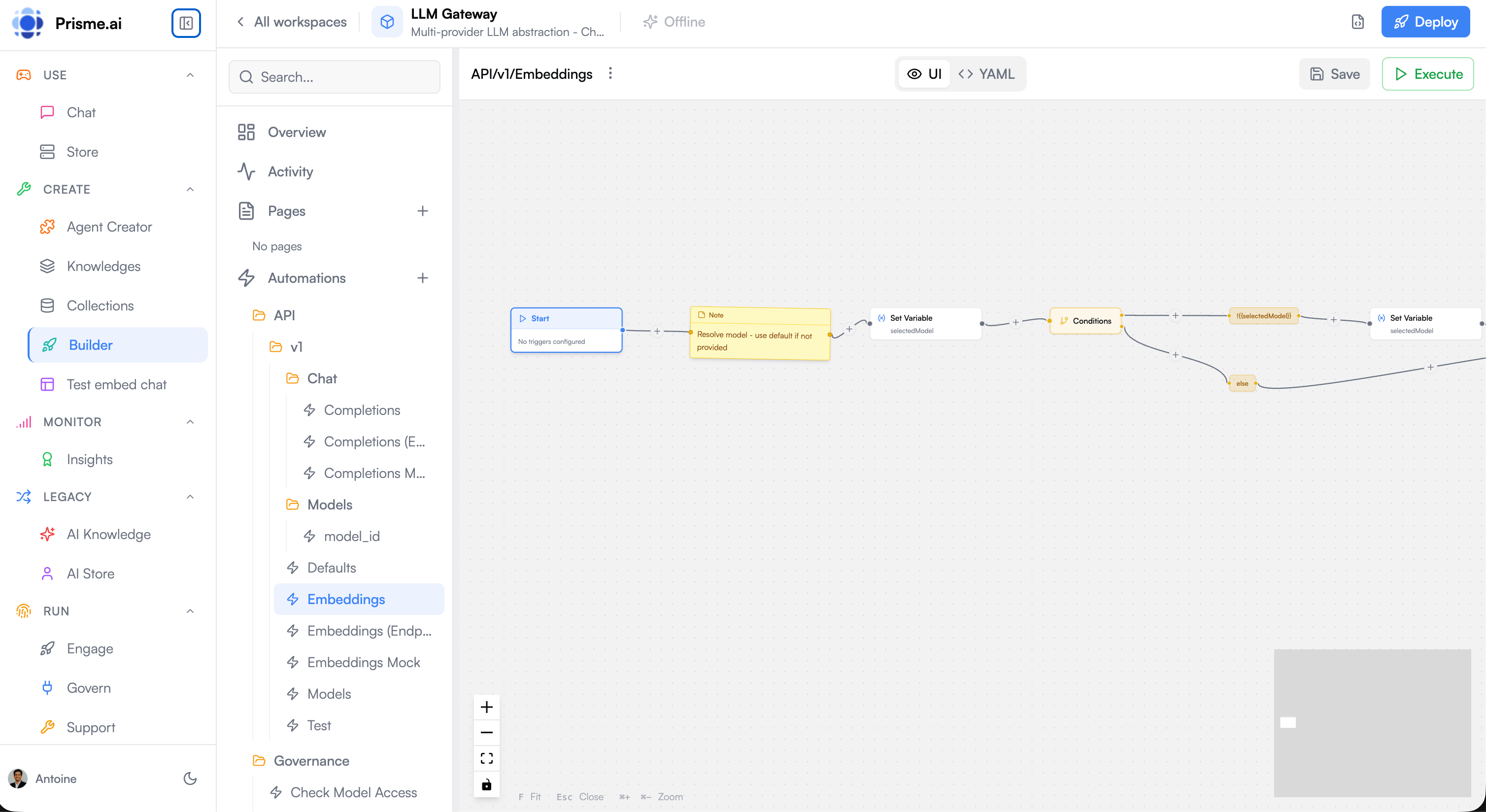 The AI assistant panel slides in from the right when toggled from the header bar.
## Header bar
The header is always visible.
| Control | Action |
| --------------------------------------------------- | ---------------------------------------------------------------------------------------------------------------------------------------------------------------- |
| Back arrow / "All Workspaces" | Returns to the Builder home (workspace list). |
| Workspace name and icon | Display only. Edit them from **Settings → General** or by clicking **Edit YAML**. |
| Workspace description | Truncated to \~200px. Full text in **Settings → General**. |
| **Edit YAML** button (file-code icon) | Opens a Monaco editor on the raw workspace `index.yml` (name, slug, description, config, secret schema, repositories). Saving writes through the workspaces API. |
| **AI** toggle (sparkles icon) | Opens and closes the right-side AI assistant panel. |
| **Version dropdown** (visible when a deploy exists) | Switches the main pane to a read-only preview of a previously deployed bundle. |
| **Deploy** button (rocket icon, primary) | Opens the [Deploy modal](/products/ai-builder/deployment#the-deploy-modal). |
| Presence avatars | One avatar per other editor currently looking at the workspace. |
## Sidebar
The sidebar is the workspace navigation tree.
| Entry | Opens | Notes |
| --------------- | ------------------------------------------------------------------------------------------------------ | ------------------------------------------------------------------------------------------------------------------------------------------------------------------------------- |
| **Overview** | Workspace [Overview tab](#overview-tab) | Default landing tab. |
| **Activity** | [Activity tab](#activity-tab) | Event log + filters + correlation IDs. See [Testing & Debugging](/products/ai-builder/testing-debugging). |
| **Pages** | The page editor. The `+` action creates a new page; existing pages are listed below. | Each page shows a sublabel: `SPA` for editable source, `Read-only` for the version currently being viewed in the version dropdown, `Deployed` for an immutable deploy snapshot. |
| **Automations** | The automation editor. The `+` action creates a new automation; existing automations are listed below. | Automations whose `name` contains `/` characters are rendered as folders (`finance/invoices/process` → finance → invoices → process). |
| **Imports** | The imports tab. The `+` action opens the App Store. | Each installed app shows a `Disabled` badge if its config has it turned off. |
| **Files** | The [Files tab](#files-tab) | List of uploaded workspace assets. |
| **Settings** | The [Settings tab](#settings-tab) | Workspace configuration. |
A search box at the top filters all sidebar entries (pages, automations, imports) by name or slug.
## Editor toolbar
The toolbar above the main pane changes depending on what is being edited.
| Control | Visible for | Action |
| ------------------------------------ | -------------------- | ------------------------------------------------------------------------------------------------------------------------------- |
| Item name (inline-editable) | pages, automations | Click to rename. The new value is persisted on `Enter` or blur. |
| **... menu** | pages, automations | Exposes **Rename**, **Duplicate**, **Delete**. Delete requires confirmation. |
| **Code / Preview** toggle | pages | Switches between the source editor and the rendered preview. |
| **Desktop / Tablet / Mobile** sizing | pages (preview mode) | Changes the preview viewport. |
| Unsaved indicator (red dot) | pages, automations | Shown whenever there are local changes. |
| **Save** | pages, automations | Disabled until there are local changes. Persists via the workspaces API. |
| **Execute** | automations | Opens the Execute modal where you set inputs and run the automation once. Disabled when there are unsaved changes (save first). |
## Overview tab
The first thing you see when opening a workspace.
| Section | Content |
| ------------------------ | ---------------------------------------------------------------------------------------------------------------------------------------------------- |
| **Alerts** | Cards surfacing setup problems or recent failures. Each card has an action link that jumps to the relevant section. |
| **Usage stats (7 days)** | Three cards (Users, Requests, Errors) with trend arrows, plus a sparkline of requests per day. |
| **Top errors** | Ranked list of the most frequent error events of the last week. Each row has a "View trace" link that opens Activity filtered on the correlation ID. |
| **Recent changes** | Last few workspace edits with user, action, file, and timestamp. The "View history" link opens Activity filtered on `workspaces.*` events. |
| **Quick actions** | One-click shortcuts: **Push on Git** (Settings → Versioning) and **Publish as App** (Settings → Packaging). |
A refresh button next to the title re-fetches the stats.
## Automation tab
The automation tab is the most feature-rich. Its header strip exposes:
| Control | Action |
| ----------- | ----------------------------------------------------------------------------------------------- |
| Back arrow | Returns to the automation list. |
| Name | Click to rename. Hover to reveal **Copy slug**. |
| Slug | The unique identifier used in URLs and events. Not editable — derived from `slug:` in the YAML. |
| **Execute** | Opens the Execute modal. Disabled if the automation is new or has unsaved changes. |
| **Delete** | Two-click confirmation; deletes the automation. |
| **Save** | Disabled until there are changes. Writes the YAML to the workspace. |
Below the header, you can switch between **Visual graph** and **Code** (YAML). The two views are fully equivalent — see [Visual Editor and YAML Mapping](/products/ai-builder/automations#visual-editor-and-yaml-mapping).
## Page tab
A page is a React source tree. The tab exposes:
* **Code view** — a file explorer on the left and a Monaco editor on the right. Supports folder creation, file creation, rename, and delete.
* **Preview view** — Builder compiles the source and renders the React app inside the preview pane, with the runtime `AppProps` injected (`sdk`, `user`, `workspace`, `backends`).
Save persists the entire source tree to the workspace as page files. Deploy bundles the tree into a JavaScript bundle (see [Deploy modal](/products/ai-builder/deployment#the-deploy-modal)).
## Imports tab
The imports tab is where installed apps live.
| Control | Action |
| ----------------------------------------------------- | --------------------------------------------------------------------------------- |
| **Install** (sidebar `+` button) | Opens the App Store modal. |
| App card | Shows the app slug and a `Disabled` badge if it is turned off. |
| **View docs** (external-link icon) | Opens the app's documentation URL. |
| **Configure** (gear icon) | Opens the per-app config form. Fields are generated from the app's config schema. |
| **Uninstall** (trash icon, double-click confirmation) | Removes the app from the workspace. |
### App Store modal
* A search box filters apps by name.
* A category filter narrows the catalog.
* Each app card shows its name, description, photo, and last update date.
* **Install** adds the app to the workspace and creates a default config you can then edit.
## Files tab
The Files tab is documented on its own page — see [Files](/products/ai-builder/files).
## Activity tab
Activity is the workspace event log. It is documented in [Testing & Debugging](/products/ai-builder/testing-debugging) — the page covers correlation IDs, the four views (Table, Timeline, Graph, Distribution), and the filter grammar.
## Settings tab
Settings is a multi-tab pane. The sections below describe each sub-tab.
### General
| Field | Persists to |
| --------------- | ------------------------------------------------------------------------------------------------------- |
| **Name** | Workspace name shown in the sidebar, app store, and breadcrumbs. |
| **Description** | Long description shown in the overview and (if published) in the app store. |
| **Slug** | URL-safe identifier used in `/apps/` and webhook routes. Changing it breaks existing public URLs. |
| **Save** | Writes the three fields via the workspaces API. |
### Versioning
Documented on the [Versioning](/products/ai-builder/versioning#versioning-tab-ui) page — covers the **Push**, **Pull**, **Export**, **Import**, and **Import (Prune)** buttons and the differences between them.
### Secrets
Documented on the [Secrets module](/products/ai-builder/module-secrets#settings--secrets-form) page — covers the schema-defined secrets and the **Additional Secrets** form.
### Security (RBAC)
A Monaco YAML editor on the workspace `security` document.
| Control | Action |
| ------------- | ------------------------------------------------------------------ |
| Monaco editor | Edits the YAML defining roles, abilities, and per-resource grants. |
| **Reset** | Reverts to the last saved version. |
| **Save** | Persists via `PUT /workspaces/{id}/security`. |
The role grammar itself is documented in [RBAC](/products/ai-builder/rbac).
### Sharing
| Control | Action |
| ---------------------------------- | ------------------------------------------------------------------------------------------------------------------------------- |
| Member row | Shows the user, their current role, and a role dropdown. Changing the dropdown calls `PATCH /workspaces/{id}/members/{userId}`. |
| **Delete** member | Removes the member from the workspace. |
| **Add member** form (email + role) | Calls `POST /workspaces/{id}/members`; sends an invite if the email is unknown, adds the user immediately otherwise. |
### Packaging
The Packaging tab lets you publish the workspace as a reusable app in the platform's app store.
| Field | Notes |
| ---------------- | ------------------------------------------------------------------------------------------------------------------------------------------------------------------------------------ |
| **Photo** | Image upload. Limited to 2 MB and must be an image MIME type. |
| **Slug** | The app slug under which the workspace will appear in the store. Once the workspace has been published once, the slug is read-only — it becomes the immutable identifier of the app. |
| **Description** | Optional short description shown in the app store. |
| **Version name** | Optional human-readable version label (the version is created regardless). |
| **Publish** | Uploads the photo (if changed), updates the workspace, then creates an app store entry pointing at the new version. |
## Deploy modal
Opened from the **Deploy** button in the header bar. Documented in [Deployment](/products/ai-builder/deployment#the-deploy-modal) — covers the Publish tab (bundle build, version assignment) and the Share tab (Platform URL, four embed modes, `
The AI assistant panel slides in from the right when toggled from the header bar.
## Header bar
The header is always visible.
| Control | Action |
| --------------------------------------------------- | ---------------------------------------------------------------------------------------------------------------------------------------------------------------- |
| Back arrow / "All Workspaces" | Returns to the Builder home (workspace list). |
| Workspace name and icon | Display only. Edit them from **Settings → General** or by clicking **Edit YAML**. |
| Workspace description | Truncated to \~200px. Full text in **Settings → General**. |
| **Edit YAML** button (file-code icon) | Opens a Monaco editor on the raw workspace `index.yml` (name, slug, description, config, secret schema, repositories). Saving writes through the workspaces API. |
| **AI** toggle (sparkles icon) | Opens and closes the right-side AI assistant panel. |
| **Version dropdown** (visible when a deploy exists) | Switches the main pane to a read-only preview of a previously deployed bundle. |
| **Deploy** button (rocket icon, primary) | Opens the [Deploy modal](/products/ai-builder/deployment#the-deploy-modal). |
| Presence avatars | One avatar per other editor currently looking at the workspace. |
## Sidebar
The sidebar is the workspace navigation tree.
| Entry | Opens | Notes |
| --------------- | ------------------------------------------------------------------------------------------------------ | ------------------------------------------------------------------------------------------------------------------------------------------------------------------------------- |
| **Overview** | Workspace [Overview tab](#overview-tab) | Default landing tab. |
| **Activity** | [Activity tab](#activity-tab) | Event log + filters + correlation IDs. See [Testing & Debugging](/products/ai-builder/testing-debugging). |
| **Pages** | The page editor. The `+` action creates a new page; existing pages are listed below. | Each page shows a sublabel: `SPA` for editable source, `Read-only` for the version currently being viewed in the version dropdown, `Deployed` for an immutable deploy snapshot. |
| **Automations** | The automation editor. The `+` action creates a new automation; existing automations are listed below. | Automations whose `name` contains `/` characters are rendered as folders (`finance/invoices/process` → finance → invoices → process). |
| **Imports** | The imports tab. The `+` action opens the App Store. | Each installed app shows a `Disabled` badge if its config has it turned off. |
| **Files** | The [Files tab](#files-tab) | List of uploaded workspace assets. |
| **Settings** | The [Settings tab](#settings-tab) | Workspace configuration. |
A search box at the top filters all sidebar entries (pages, automations, imports) by name or slug.
## Editor toolbar
The toolbar above the main pane changes depending on what is being edited.
| Control | Visible for | Action |
| ------------------------------------ | -------------------- | ------------------------------------------------------------------------------------------------------------------------------- |
| Item name (inline-editable) | pages, automations | Click to rename. The new value is persisted on `Enter` or blur. |
| **... menu** | pages, automations | Exposes **Rename**, **Duplicate**, **Delete**. Delete requires confirmation. |
| **Code / Preview** toggle | pages | Switches between the source editor and the rendered preview. |
| **Desktop / Tablet / Mobile** sizing | pages (preview mode) | Changes the preview viewport. |
| Unsaved indicator (red dot) | pages, automations | Shown whenever there are local changes. |
| **Save** | pages, automations | Disabled until there are local changes. Persists via the workspaces API. |
| **Execute** | automations | Opens the Execute modal where you set inputs and run the automation once. Disabled when there are unsaved changes (save first). |
## Overview tab
The first thing you see when opening a workspace.
| Section | Content |
| ------------------------ | ---------------------------------------------------------------------------------------------------------------------------------------------------- |
| **Alerts** | Cards surfacing setup problems or recent failures. Each card has an action link that jumps to the relevant section. |
| **Usage stats (7 days)** | Three cards (Users, Requests, Errors) with trend arrows, plus a sparkline of requests per day. |
| **Top errors** | Ranked list of the most frequent error events of the last week. Each row has a "View trace" link that opens Activity filtered on the correlation ID. |
| **Recent changes** | Last few workspace edits with user, action, file, and timestamp. The "View history" link opens Activity filtered on `workspaces.*` events. |
| **Quick actions** | One-click shortcuts: **Push on Git** (Settings → Versioning) and **Publish as App** (Settings → Packaging). |
A refresh button next to the title re-fetches the stats.
## Automation tab
The automation tab is the most feature-rich. Its header strip exposes:
| Control | Action |
| ----------- | ----------------------------------------------------------------------------------------------- |
| Back arrow | Returns to the automation list. |
| Name | Click to rename. Hover to reveal **Copy slug**. |
| Slug | The unique identifier used in URLs and events. Not editable — derived from `slug:` in the YAML. |
| **Execute** | Opens the Execute modal. Disabled if the automation is new or has unsaved changes. |
| **Delete** | Two-click confirmation; deletes the automation. |
| **Save** | Disabled until there are changes. Writes the YAML to the workspace. |
Below the header, you can switch between **Visual graph** and **Code** (YAML). The two views are fully equivalent — see [Visual Editor and YAML Mapping](/products/ai-builder/automations#visual-editor-and-yaml-mapping).
## Page tab
A page is a React source tree. The tab exposes:
* **Code view** — a file explorer on the left and a Monaco editor on the right. Supports folder creation, file creation, rename, and delete.
* **Preview view** — Builder compiles the source and renders the React app inside the preview pane, with the runtime `AppProps` injected (`sdk`, `user`, `workspace`, `backends`).
Save persists the entire source tree to the workspace as page files. Deploy bundles the tree into a JavaScript bundle (see [Deploy modal](/products/ai-builder/deployment#the-deploy-modal)).
## Imports tab
The imports tab is where installed apps live.
| Control | Action |
| ----------------------------------------------------- | --------------------------------------------------------------------------------- |
| **Install** (sidebar `+` button) | Opens the App Store modal. |
| App card | Shows the app slug and a `Disabled` badge if it is turned off. |
| **View docs** (external-link icon) | Opens the app's documentation URL. |
| **Configure** (gear icon) | Opens the per-app config form. Fields are generated from the app's config schema. |
| **Uninstall** (trash icon, double-click confirmation) | Removes the app from the workspace. |
### App Store modal
* A search box filters apps by name.
* A category filter narrows the catalog.
* Each app card shows its name, description, photo, and last update date.
* **Install** adds the app to the workspace and creates a default config you can then edit.
## Files tab
The Files tab is documented on its own page — see [Files](/products/ai-builder/files).
## Activity tab
Activity is the workspace event log. It is documented in [Testing & Debugging](/products/ai-builder/testing-debugging) — the page covers correlation IDs, the four views (Table, Timeline, Graph, Distribution), and the filter grammar.
## Settings tab
Settings is a multi-tab pane. The sections below describe each sub-tab.
### General
| Field | Persists to |
| --------------- | ------------------------------------------------------------------------------------------------------- |
| **Name** | Workspace name shown in the sidebar, app store, and breadcrumbs. |
| **Description** | Long description shown in the overview and (if published) in the app store. |
| **Slug** | URL-safe identifier used in `/apps/` and webhook routes. Changing it breaks existing public URLs. |
| **Save** | Writes the three fields via the workspaces API. |
### Versioning
Documented on the [Versioning](/products/ai-builder/versioning#versioning-tab-ui) page — covers the **Push**, **Pull**, **Export**, **Import**, and **Import (Prune)** buttons and the differences between them.
### Secrets
Documented on the [Secrets module](/products/ai-builder/module-secrets#settings--secrets-form) page — covers the schema-defined secrets and the **Additional Secrets** form.
### Security (RBAC)
A Monaco YAML editor on the workspace `security` document.
| Control | Action |
| ------------- | ------------------------------------------------------------------ |
| Monaco editor | Edits the YAML defining roles, abilities, and per-resource grants. |
| **Reset** | Reverts to the last saved version. |
| **Save** | Persists via `PUT /workspaces/{id}/security`. |
The role grammar itself is documented in [RBAC](/products/ai-builder/rbac).
### Sharing
| Control | Action |
| ---------------------------------- | ------------------------------------------------------------------------------------------------------------------------------- |
| Member row | Shows the user, their current role, and a role dropdown. Changing the dropdown calls `PATCH /workspaces/{id}/members/{userId}`. |
| **Delete** member | Removes the member from the workspace. |
| **Add member** form (email + role) | Calls `POST /workspaces/{id}/members`; sends an invite if the email is unknown, adds the user immediately otherwise. |
### Packaging
The Packaging tab lets you publish the workspace as a reusable app in the platform's app store.
| Field | Notes |
| ---------------- | ------------------------------------------------------------------------------------------------------------------------------------------------------------------------------------ |
| **Photo** | Image upload. Limited to 2 MB and must be an image MIME type. |
| **Slug** | The app slug under which the workspace will appear in the store. Once the workspace has been published once, the slug is read-only — it becomes the immutable identifier of the app. |
| **Description** | Optional short description shown in the app store. |
| **Version name** | Optional human-readable version label (the version is created regardless). |
| **Publish** | Uploads the photo (if changed), updates the workspace, then creates an app store entry pointing at the new version. |
## Deploy modal
Opened from the **Deploy** button in the header bar. Documented in [Deployment](/products/ai-builder/deployment#the-deploy-modal) — covers the Publish tab (bundle build, version assignment) and the Share tab (Platform URL, four embed modes, `