> ## Documentation Index
> Fetch the complete documentation index at: https://docs.prisme.ai/llms.txt
> Use this file to discover all available pages before exploring further.
# App Store Overview
> Discover how the Prisme.ai App Store enhances your AI solutions with powerful integrations
 # App Store Overview
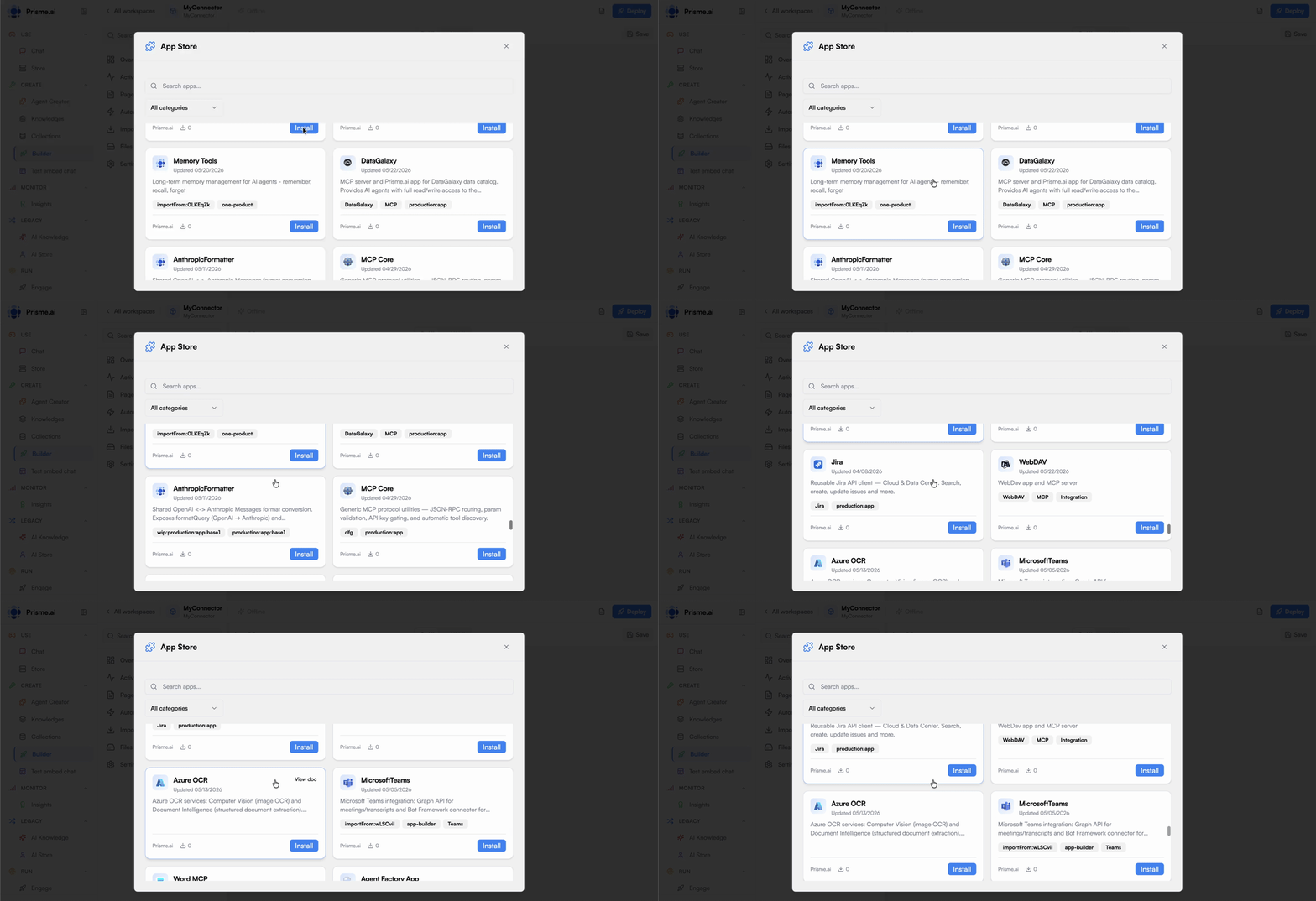
The Prisme.ai App Store is a central hub where you can discover, install, and manage a wide range of integrations and extensions. In Builder, open any workspace and click **+** beside **Imports** to browse the App Store. These apps expand the platform's capabilities, allowing you to connect to external services, leverage infrastructure components, and enhance your interfaces with specialized functionality.
## The Apps Ecosystem
The App Store operates as an ecosystem that brings together various components:
Ready-to-use apps developed by Prisme.ai and partners
Access to platform capabilities like Crawler, Custom Code, and Collection
Specialized interface elements for building rich experiences
Organization-specific integrations and components
This ecosystem approach provides a standardized way to extend the platform while maintaining security, governance, and ease of use.
## App Store Features
Find the right integrations for your needs:
* **Categorized Browsing**: Explore apps by category, function, or use case
* **Search Functionality**: Find specific apps based on keywords or capabilities
* **Detailed Listings**: View comprehensive information about each app
* **Screenshots and Examples**: See apps in action before installation
* **User Ratings**: Benefit from feedback from other users
The discovery experience helps you identify the best integrations for your specific requirements.
Streamlined process for adding apps to your workspaces:
* **One-Click Installation**: Add apps to your workspace with minimal effort
* **Guided Setup**: Step-by-step configuration wizards
* **Secure Credential Management**: Protected storage for authentication details
* **Version Management**: Control which version of an app is active
* **Dependency Handling**: Automatic management of required components
The installation process is designed to be straightforward while maintaining security and control.
Efficiently use and manage your installed apps:
* **Integration with Builder**: Seamlessly use app capabilities in workflows
* **Visibility Controls**: Determine who can see and use each app
* **Usage Monitoring**: Track how apps are being utilized
* **Resource Controls**: Manage quotas and limits
* **Configuration Updates**: Modify settings as needs change
These management features provide governance over your integration landscape.
Extend the App Store with your own apps:
* **Development Framework**: Tools for creating custom apps
* **Testing Environment**: Validate apps before publication
* **Private App Store**: Organization-specific app repository
* **Versioning**: Manage app iterations and updates
* **Documentation Tools**: Create comprehensive app documentation
These capabilities allow you to build an internal App Store that reflects your organization's unique needs.
## Key App Categories
The App Store includes several major categories of integrations:
Connect with messaging platforms, email services, and collaboration tools:
* **Email Providers**: SendGrid, Mailjet, SMTP services
* **Messaging Platforms**: Slack, Microsoft Teams, Discord
* **Meeting Services**: Zoom, Google Meet, Microsoft Teams
* **Notification Systems**: Push notifications, SMS gateways
These integrations enable AI solutions to communicate with users through their preferred channels.
Access and manage information across various repositories:
* **Document Stores**: SharePoint, Google Drive, Dropbox
* **Content Management**: WordPress, Drupal, Contentful
* **Knowledge Bases**: Confluence, Notion, internal wikis
* **Web Crawling**: Site extraction and processing
These connections allow AI agents to access and utilize organizational knowledge.
Integrate with core business applications:
* **CRM Systems**: Salesforce, Dynamics, HubSpot
* **ERP Platforms**: SAP, Oracle, NetSuite
* **HR Systems**: Workday, BambooHR, ADP
* **Ticketing Tools**: Zendesk, ServiceNow, Jira
These integrations enable AI to interact with mission-critical systems.
Process and understand various types of data:
* **Database Connectors**: SQL, MongoDB, Elasticsearch
* **Analytics Platforms**: Google Analytics, Mixpanel, Amplitude
* **Data Enrichment**: Clearbit, ZoomInfo, FullContact
* **Custom Code Execution**: JavaScript, Python processing
These capabilities allow for sophisticated data operations within AI workflows.
Enhance user interfaces and data presentation:
* **Chart Libraries**: Interactive data visualizations
* **Specialized Inputs**: Advanced form components
* **Media Handlers**: Image, video, and audio components
* **Layout Systems**: Responsive design components
These elements improve the presentation and user experience of AI applications.
## Featured Platform Infrastructure Apps
Prisme.ai provides several core infrastructure apps that extend the platform's capabilities:
Web content extraction and processing
Execute custom JavaScript and Python code
Simplified database access and management
Connect to external services and APIs
These infrastructure apps provide fundamental capabilities that power many advanced use cases on the platform.
## Using Apps with Knowledges and Agents
Apps in the App Store can significantly enhance your AI agents and knowledge bases:
Connect Knowledges to various repositories through apps, expanding available information
Give AI agents the ability to perform actions through app integrations
Access real-time data from external systems to enhance AI responses
Allow agents to initiate and manage workflows in business systems
These integrations transform AI agents from passive information providers to active participants in business processes.
## Building an Internal App Ecosystem
One of the most powerful aspects of the App Store is the ability to create an internal ecosystem of custom apps:
Create connectors to your organization's existing systems
Build apps for your specific industry or use cases
Implement company-specific components and patterns
Create a controlled access point to sensitive systems
This approach allows you to:
1. **Maximize Reuse**: Build integration components once and use them across projects
2. **Centralize Security**: Manage credentials and access control in one place
3. **Standardize Practices**: Establish consistent integration patterns
4. **Scale Automation**: Enable AI agents to leverage all your organizational tools
## Installation and Configuration Workflow
Adding an app to your workspace involves a straightforward process:
Explore the App Store to find the app you need
Check app information, requirements, and permissions
Add the app to your workspace with a single click
Set up necessary credentials and settings
Verify that the integration works as expected
Incorporate the app into your AI solutions
This process is designed to be simple while maintaining security and control.
## Governance and Management
The App Store includes features for governing your app ecosystem:
Determine who can install and use apps:
* Role-based permissions for app installation
* Workspace-level access controls
* Approval workflows for sensitive integrations
* User and group assignments
These controls ensure that app access aligns with organizational policies.
Track how apps are being used:
* Usage metrics and statistics
* API call volume and patterns
* Performance monitoring
* Error tracking and alerts
This visibility helps you understand app adoption and identify issues.
Control resource allocation and limits:
* API quota management
* Storage allocation
* Processing capacity
* Rate limiting
These controls prevent excessive resource consumption and associated costs.
Maintain app configurations:
* Version control for configurations
* Configuration templates
* Bulk updates and changes
* Audit history of modifications
These capabilities help manage configurations across multiple apps and environments.
## Getting Started
To begin using the App Store:
In Builder, open any workspace and click **+** next to **Imports** in the sidebar.
Browse categories or search for specific functionalities
Start with core infrastructure apps like Crawler, Custom Code, and Collection
Install apps that connect to external services you use
Identify gaps where custom apps might be beneficial
## Next Steps
Explore the different types of available apps
Learn about connecting to external APIs
Discover web content extraction capabilities
Execute custom logic within your workflows
Manage data with simplified database access
Create your own custom integrations
# App Store Overview
The Prisme.ai App Store is a central hub where you can discover, install, and manage a wide range of integrations and extensions. In Builder, open any workspace and click **+** beside **Imports** to browse the App Store. These apps expand the platform's capabilities, allowing you to connect to external services, leverage infrastructure components, and enhance your interfaces with specialized functionality.
## The Apps Ecosystem
The App Store operates as an ecosystem that brings together various components:
Ready-to-use apps developed by Prisme.ai and partners
Access to platform capabilities like Crawler, Custom Code, and Collection
Specialized interface elements for building rich experiences
Organization-specific integrations and components
This ecosystem approach provides a standardized way to extend the platform while maintaining security, governance, and ease of use.
## App Store Features
Find the right integrations for your needs:
* **Categorized Browsing**: Explore apps by category, function, or use case
* **Search Functionality**: Find specific apps based on keywords or capabilities
* **Detailed Listings**: View comprehensive information about each app
* **Screenshots and Examples**: See apps in action before installation
* **User Ratings**: Benefit from feedback from other users
The discovery experience helps you identify the best integrations for your specific requirements.
Streamlined process for adding apps to your workspaces:
* **One-Click Installation**: Add apps to your workspace with minimal effort
* **Guided Setup**: Step-by-step configuration wizards
* **Secure Credential Management**: Protected storage for authentication details
* **Version Management**: Control which version of an app is active
* **Dependency Handling**: Automatic management of required components
The installation process is designed to be straightforward while maintaining security and control.
Efficiently use and manage your installed apps:
* **Integration with Builder**: Seamlessly use app capabilities in workflows
* **Visibility Controls**: Determine who can see and use each app
* **Usage Monitoring**: Track how apps are being utilized
* **Resource Controls**: Manage quotas and limits
* **Configuration Updates**: Modify settings as needs change
These management features provide governance over your integration landscape.
Extend the App Store with your own apps:
* **Development Framework**: Tools for creating custom apps
* **Testing Environment**: Validate apps before publication
* **Private App Store**: Organization-specific app repository
* **Versioning**: Manage app iterations and updates
* **Documentation Tools**: Create comprehensive app documentation
These capabilities allow you to build an internal App Store that reflects your organization's unique needs.
## Key App Categories
The App Store includes several major categories of integrations:
Connect with messaging platforms, email services, and collaboration tools:
* **Email Providers**: SendGrid, Mailjet, SMTP services
* **Messaging Platforms**: Slack, Microsoft Teams, Discord
* **Meeting Services**: Zoom, Google Meet, Microsoft Teams
* **Notification Systems**: Push notifications, SMS gateways
These integrations enable AI solutions to communicate with users through their preferred channels.
Access and manage information across various repositories:
* **Document Stores**: SharePoint, Google Drive, Dropbox
* **Content Management**: WordPress, Drupal, Contentful
* **Knowledge Bases**: Confluence, Notion, internal wikis
* **Web Crawling**: Site extraction and processing
These connections allow AI agents to access and utilize organizational knowledge.
Integrate with core business applications:
* **CRM Systems**: Salesforce, Dynamics, HubSpot
* **ERP Platforms**: SAP, Oracle, NetSuite
* **HR Systems**: Workday, BambooHR, ADP
* **Ticketing Tools**: Zendesk, ServiceNow, Jira
These integrations enable AI to interact with mission-critical systems.
Process and understand various types of data:
* **Database Connectors**: SQL, MongoDB, Elasticsearch
* **Analytics Platforms**: Google Analytics, Mixpanel, Amplitude
* **Data Enrichment**: Clearbit, ZoomInfo, FullContact
* **Custom Code Execution**: JavaScript, Python processing
These capabilities allow for sophisticated data operations within AI workflows.
Enhance user interfaces and data presentation:
* **Chart Libraries**: Interactive data visualizations
* **Specialized Inputs**: Advanced form components
* **Media Handlers**: Image, video, and audio components
* **Layout Systems**: Responsive design components
These elements improve the presentation and user experience of AI applications.
## Featured Platform Infrastructure Apps
Prisme.ai provides several core infrastructure apps that extend the platform's capabilities:
Web content extraction and processing
Execute custom JavaScript and Python code
Simplified database access and management
Connect to external services and APIs
These infrastructure apps provide fundamental capabilities that power many advanced use cases on the platform.
## Using Apps with Knowledges and Agents
Apps in the App Store can significantly enhance your AI agents and knowledge bases:
Connect Knowledges to various repositories through apps, expanding available information
Give AI agents the ability to perform actions through app integrations
Access real-time data from external systems to enhance AI responses
Allow agents to initiate and manage workflows in business systems
These integrations transform AI agents from passive information providers to active participants in business processes.
## Building an Internal App Ecosystem
One of the most powerful aspects of the App Store is the ability to create an internal ecosystem of custom apps:
Create connectors to your organization's existing systems
Build apps for your specific industry or use cases
Implement company-specific components and patterns
Create a controlled access point to sensitive systems
This approach allows you to:
1. **Maximize Reuse**: Build integration components once and use them across projects
2. **Centralize Security**: Manage credentials and access control in one place
3. **Standardize Practices**: Establish consistent integration patterns
4. **Scale Automation**: Enable AI agents to leverage all your organizational tools
## Installation and Configuration Workflow
Adding an app to your workspace involves a straightforward process:
Explore the App Store to find the app you need
Check app information, requirements, and permissions
Add the app to your workspace with a single click
Set up necessary credentials and settings
Verify that the integration works as expected
Incorporate the app into your AI solutions
This process is designed to be simple while maintaining security and control.
## Governance and Management
The App Store includes features for governing your app ecosystem:
Determine who can install and use apps:
* Role-based permissions for app installation
* Workspace-level access controls
* Approval workflows for sensitive integrations
* User and group assignments
These controls ensure that app access aligns with organizational policies.
Track how apps are being used:
* Usage metrics and statistics
* API call volume and patterns
* Performance monitoring
* Error tracking and alerts
This visibility helps you understand app adoption and identify issues.
Control resource allocation and limits:
* API quota management
* Storage allocation
* Processing capacity
* Rate limiting
These controls prevent excessive resource consumption and associated costs.
Maintain app configurations:
* Version control for configurations
* Configuration templates
* Bulk updates and changes
* Audit history of modifications
These capabilities help manage configurations across multiple apps and environments.
## Getting Started
To begin using the App Store:
In Builder, open any workspace and click **+** next to **Imports** in the sidebar.
Browse categories or search for specific functionalities
Start with core infrastructure apps like Crawler, Custom Code, and Collection
Install apps that connect to external services you use
Identify gaps where custom apps might be beneficial
## Next Steps
Explore the different types of available apps
Learn about connecting to external APIs
Discover web content extraction capabilities
Execute custom logic within your workflows
Manage data with simplified database access
Create your own custom integrations